
在 Bootstrap 中从任意位置对齐弹性项目
bootstrapweb developmentcss framework更新于 2024/1/31 10:20:17
使用 Bootstrap 中的 .justify-content-* 类,可以从起始、结束、居中、中间等位置对齐弹性项目。
对于 justify-content-start,两端对齐的弹性项目将像这样对齐 −

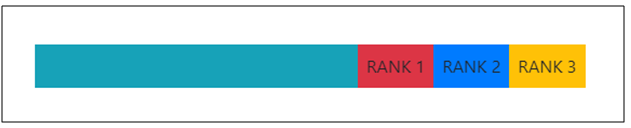
对于 justify-content-end,对齐的弹性项目将像这样对齐 −
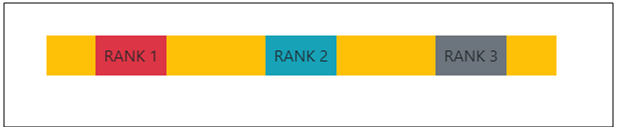
对于 justify-content-around,对齐的弹性项目将像这样对齐 −
让我们看看如何证明内容 −
示例
<!DOCTYPE html>
<html lang="en">
<head>
  <title>Bootstrap Example</title>
  <meta charset="utf-8">
  <meta name="viewport" content="width=device-width, initial-scale=1">
  <link rel="stylesheet" href="https://maxcdn.bootstrapcdn.com/bootstrap/4.1.0/css/bootstrap.min.css">
  <script src="https://ajax.googleapis.com/ajax/libs/jquery/3.3.1/jquery.min.js"></script>
  <script src="https://maxcdn.bootstrapcdn.com/bootstrap/4.1.0/js/bootstrap.min.js"></script>
</head>
<body>
  <div class="container mt-3">
    <div class="d-flex justify-content-start bg-primary mb-5">
      <div class="p-2 bg-danger">Rank 1</div>
      <div class="p-2 bg-secondary">RANK 2</div>
      <div class="p-2 bg-warning">RANK3</div>
    </div>
    <div class="d-flex justify-content-end bg-info mb-5">
      <div class="p-2 bg-danger">RANK 1</div>
      <div class="p-2 bg-primary">RANK 2</div>
      <div class="p-2 bg-warning">RANK 3</div>
    </div>
    <div class="d-flex justify-content-around bg-warning mb-5">
      <div class="p-2 bg-danger">RANK 1</div>
      <div class="p-2 bg-info">RANK 2</div>
      <div class="p-2 bg-secondary">RANK 3</div>
    </div>
  </div>
</body>
</html>

