
CSS 中的块级元素和块框
cssweb developmentfront end technology更新于 2025/1/10 19:24:17
块级元素的 CSS display 属性设置为 ‘block’、‘list-item’ 或 ‘table’,这些元素会强制在其自身上方和下方换行。块级框由每个块级元素生成,这些元素是定位方案的一部分,并且包含子框。
块容器框要么包含块级框并遵循块格式化上下文,要么包含行内框并遵循行内格式化上下文。如果块级框也是块容器,则使用"块框"一词。
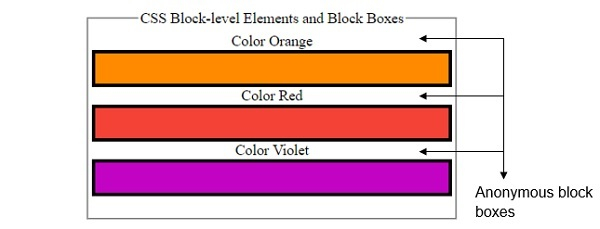
匿名块框是指开发人员无法控制的框。如果一个行内框包含一个块框,并且块框周围的行内内容被包含在一个匿名块框中。
示例
让我们看一个块级元素和块框的示例 −
<!DOCTYPE html>
<html>
<head>
<title>CSS Block-level Elements and Block Boxes</title>
<style>
form {
   width:70%;
   margin: 0 auto;
   text-align: center;
}
* {
   padding: 2px;
   box-sizing: border-box;
   /*margin:5px;*/
}
input[type="button"] {
   border-radius: 10px;
}
.child{
   height: 40px;
   width: 100%;
   color: white;
   border: 4px solid black;
}
.child:nth-of-type(1){
   background-color: #FF8A00;
}
.child:nth-of-type(2){
   background-color: #F44336;
}
.child:nth-of-type(3){
   background-color: #C303C3;
}
.child:nth-of-type(4){
   background-color: #4CAF50;
}
.child:nth-of-type(5){
   background-color: #03A9F4;
}
.child:nth-of-type(6){
   background-color: #FEDC11;
}
</style>
</head>
<body>
<form>
<fieldset>
<legend>CSS Block-level Elements and Block Boxes</legend>
<div id="container">Color Orange
<div class="child"></div>Color Red
<div class="child"></div>Color Violet
<div class="child"></div>
</div><br>
</body>
</html>
输出
这将产生以下输出 −
相关文章
有用资源
css 参考教程 - 该教程包含有关 css 的更多信息:https://www.cainiaomax.com/css/

