
使用 Python 接球游戏
pythonserver side programmingprogramming更新于 2025/7/31 16:44:17
Python 也可用于创建电脑游戏。在本文中,我们将了解如何使用 Python 创建接球游戏。在这个游戏中,一个球不断从画布窗口顶部落下,窗口底部有一个栏。提供了两个按钮来向左和向右移动栏。使用鼠标按钮按下,我们可以移动底部的栏来接住下落的球。在不同的时间,球从不同的位置落下。
方法
以下步骤描述了构建游戏的方法。
步骤 1 − 绘制一个 tkinter 矩形画布,可用于保存进一步的布局,如各种图形、文本和图像等。
步骤 2 −创建将从顶部落下的球。使用 create_oval 方法。它需要 4 个坐标来创建一个椭圆形,它是圆形和矩形的混合体。
步骤 3 − 创建底部的条形,按下鼠标按钮时,该条形将从左向右移动。可以使用 create_rectangle 方法实现此目的。
步骤 4 − 使用 canvas.move 方法移动球或条形。此方法用于其所附着对象的垂直和水平移动。
步骤 5 − 创建将用于移动底部条形的按钮。当按钮被点击时,将触发应用于它的事件。
程序
以下是基于上述步骤使用相关方法和对象的完整程序。
示例
#使用 Python 接球比赛

from tkinter import Tk, Button, Label
from tkinter import Canvas
from random import randint
base = Tk()
base.title("BALL GAME")
base.resizable(False, False)
color = Canvas(base, width=590, height=610)
color.pack()
standard = 0
length = 5
marks = 0
class model:
   def __init__(self, color, m1, n1, m2, n2):
      self.m1 = m1
      self.n1 = n1
      self.m2 = m2
      self.n2 = n2
      self.color = color
      self.circle = color.create_oval(self.m1, self.n1, self.m2, self.n2,fill="blue", tags='dot1')
   def Game(self):
      offset = 5
      global standard
      if standard >= 510:
         global length, marks, next
         if (length - offset <= self.m1 and
            length + 40 + offset >= self.m2):
            marks += 5
            color.delete('dot1')
            game_play()
         else:
            color.delete('dot1')
            slide.remove(self)
            result()
         return

      standard += 1
      self.color.move(self.circle, 0, 1)
      self.color.after(10, self.Game)
class slide:
   def __init__(self, color, m1, n1, m2, n2):
      self.m1 = m1
      self.n1 = n1
      self.m2 = m2
      self.n2 = n2
      self.color = color
      self.num = color.create_rectangle(self.m1, self.n1, self.m2, self.n2, fill="green",       tags='dot2')
   def push(self, num):
      global length
      if (num == 1):
         self.color.move(self.num, 20, 0)
         length += 20
   else:
      self.color.move(self.num, -20, 0)
      length -= 20
   def remove(self):
      color.delete('dot2')
def game_play():
   global standard
   standard = 0
   size = randint(0, 570)
   game1 = model(color, size, 20, size + 30, 50)
   game1.Game()
def result():
   base2 = Tk()
   base2.title("THE BALL GAME")
   base2.resizable(False, False)
   set = Canvas(base2, width=300, height=300)
   set.pack()
   z = Label(set, text="\nGame over\n\nYou have scored = " + str(marks) + "\n\n")
   z.pack()
   btx = Button(set, text="Enter if you want to play again", bg="yellow", command=lambda:    repeat(base2))
   btx.pack()
   bty = Button(set, text=" CLOSE ", bg="red",command=lambda: destroy(base2))
   bty.pack()
def repeat(base2):
   base2.destroy()
   function()
def destroy(base2):
   base2.destroy()
   base.destroy()
def function():
   global marks, length
   marks = 0
   length = 0
   x1 = slide(color, 5, 560, 45, 575)
   Bt0 = Button(color, text="move right**", bg="pink",command=lambda: x1.push(1))
   Bt0.place(x=335, y=580)
   Bt1 = Button(color, text="**move left ", bg="pink", command=lambda: x1.push(0))
   Bt1.place(x=260, y=580)
   game_play()
   base.mainloop()
if (__name__ == "__main__"):
   function()
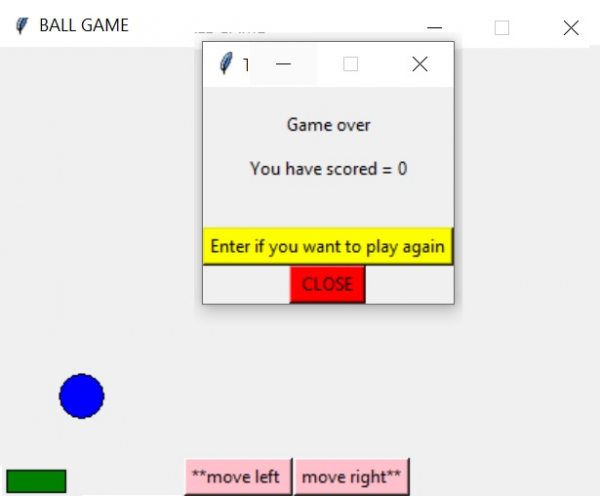
输出
运行上述代码得到以下结果 −
相关文章
有用资源
python 参考教程 - 该教程包含有关 python 的更多信息:https://www.cainiaomax.com/python/

