
使用 CSS caret-color 更改光标颜色
cssweb developmentfront end technology更新于 2024/8/29 18:52:17
要更改插入符号的颜色,请使用 CSS caret-color 属性。
示例
以下示例说明了 CSS caret-color 属性。
<!DOCTYPE html>
<html>
<head>
<style>
form {
   padding: 2%;
   margin: 2%;
   text-align: center;
}
form:focus-within {
   box-shadow: 0 0 10px rgba(0,0,0,0.6);
   background-color: beige;
}
input {
   font-size: 3em;
   caret-color: chartreuse;
   margin: 2%;
}
</style>
</head>
<body>
<form>
<input value="Check the caret color!" />
<button>Hit!</button>
</form>
</body>
</html>
输出
这将产生以下结果 −
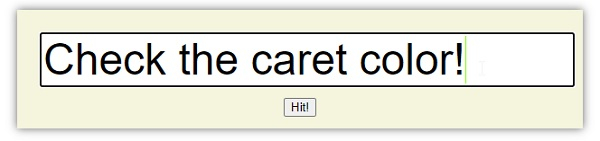
示例
<!DOCTYPE html>
<html>
<head>
<style>
form {
   padding: 2%;
   margin: 2%;
   background-color: thistle;
}
form:focus-within {
   box-shadow: 0 0 10px rgba(0,0,0,0.6);
}
textarea {
   caret-color: transparent;
}
</style>
</head>
<body>
<form>
<input type="radio" />1
<input type="radio" />2
<textarea placeholder="Invisible"></textarea>
</form>
</body>
</html>
输出
这将产生以下结果 −

相关文章
有用资源
css 参考教程 - 该教程包含有关 css 的更多信息:https://www.cainiaomax.com/css/

