
Django 中的客户端图像缩放和旋转
pythonserver side programmingprogramming更新于 2025/9/30 20:28:17
有时,我们可能需要旋转或缩放图像。在这种情况下,客户端图像缩放库用于在 html 文件上添加 jquery 缩放旋转功能。我们只需要在 html 文件中加载 jquery js 和 css。
创建一个 Django 项目和一个应用程序。设置 urls 并执行一些基本操作,例如在 INSTALLED_APPS 中添加应用程序。
安装 django-client-side-image-cropping 库
pip install django-client-side-image-cropping
现在在 settings.py 中添加以下行 −
INSTALLED_APPS+=['client_side_image_cropping']
在这里,我们完成了将模块添加为应用程序的简单设置。
示例
在 models.py 中添加以下行 −
from django.db import models

# 在此处创建您的模型。
class Data(models.Model):

   image=models.ImageField(upload_to ='myimages/')
在这里,我们设置具有图像字段的模型。
在 settings.py 中设置媒体根目录。
在 urls.py 中,添加以下行 −
from django.urls import path
from . import views
from django.conf import settings
from django.conf.urls.static import static
urlpatterns = [
   path('', views.home,name="home"),
]
urlpatterns += static(settings.MEDIA_URL,
document_root=settings.MEDIA_RO
OT)
这里,我们完成了一个基本的媒体网址设置,您肯定知道。
现在在views.py中,添加以下−
from django.shortcuts import render
from django import forms
from .models import Data
from client_side_image_cropping import ClientsideCroppingWidget

# Create your views here.
class DataForm(forms.ModelForm):
   class Meta:
      model=Data
         fields="__all__"
         widgets = {
            'image': ClientsideCroppingWidget(
               width=400,
               height=600,
               preview_width=100,
               preview_height=150,
            )
         }

def home(request):
   if request.method =="POST":
      form=DataForm(request.POST,request.FILES)
      if form.is_valid():
         form.save()
   form=DataForm()
   return render(request,'home.html',{"form":form})
在这里,我们创建了一个简单的表单。这是一个模型表单,因此在其图像字段上,我们添加了一个裁剪小部件。
在 home.html 中,添加以下 −
{% load static %}
{% load cropping %}
{% load thumbnail %}
<!DOCTYPE html>
<html>
   <head>
      <title>
         TUT
      </title>
      <link rel="stylesheet" href="{% static "client_side_i
mage_cropping/cropping.css" %}"></script>
      <link rel="stylesheet" href="{% static "client_side_i
mage_cropping/cropping_widget.css" %}"></script>
      <script src="https://ajax.googleapis.com/ajax/libs/jq
uery/1.12.4/jquery.min.js"></script>
      <script src="{% static "client_side_image_cropping/cr
oppie.min.js" %}"></script>
      <script src="{% static "client_side_image_cropping/cr
opping_widget.js" %}"></script>
   </head>
   <body>
      <h2>HI</h2>
         {% csrf_token %}
         <form method="post" enctype="multipart/formdata">
            {% csrf_token %}
            {{ form.as_p }}
            <input type="submit" value="Save"/>
      </form>
   </body>
</html>
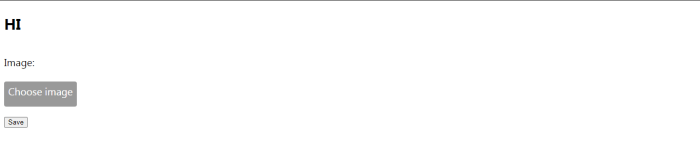
在前端,我们加载了一些 jQueries 和一些样式,并渲染将接受输入的表单。
现在一切都完成了。让我们检查一下输出。
输出
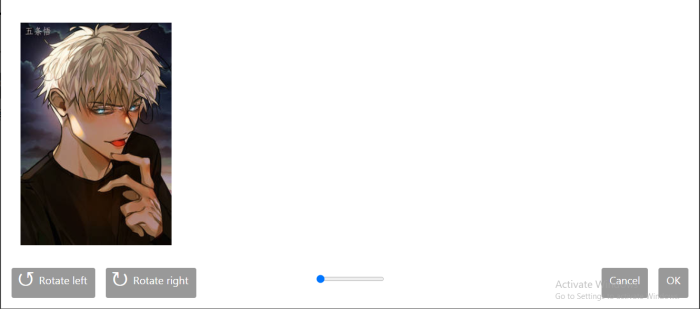
您将获得一个这样的界面,您可以在其中旋转和缩放照片。这不是一个很好看的界面,但是您可以使用 CSS 对其进行修改。
请注意,上传的图像可能看起来有位移,因此请使用旋转来设置它。位移可能是由于浏览器问题造成的。
相关文章
有用资源
python 参考教程 - 该教程包含有关 python 的更多信息:https://www.cainiaomax.com/python/

