
C# 中的 Console 类
csharpserver side programmingprogramming更新于 2025/10/8 13:32:00
C# 中的 Console 类用于表示控制台应用程序的标准输入、输出和错误流。
让我们看一些 C# 中 Console 类属性的示例 −
Console.CursorLeft 属性
要更改 C# 中 Console 的 CursorLeft,请使用 Console.CursorLeft 属性。
示例
让我们看一个例子 −
using System;
class Demo {
   public static void Main (string[] args) {
      Console.BackgroundColor = ConsoleColor.Blue;
      Console.WriteLine("Background color changed = "+Console.BackgroundColor);
      Console.ForegroundColor = ConsoleColor.Yellow;
      Console.WriteLine("
Foreground color changed = "+Console.ForegroundColor);
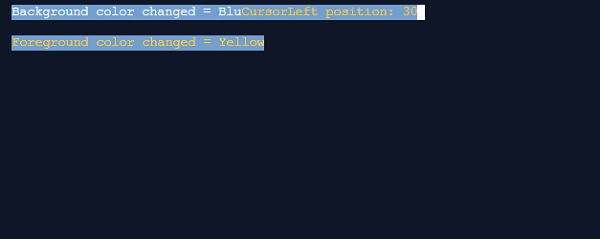
      Console.CursorLeft = 30;
      Console.Write("CursorLeft position: "+Console.CursorLeft);
   }
}
输出
这将产生以下输出 −
Console.CursorSize 属性
要在 C# 中更改控制台的 CursorSize,请使用 C# 中的 Console.CursorSize 属性。
示例
让我们看一个例子 −
using System;
class Demo {
   public static void Main (string[] args) {
      Console.BackgroundColor = ConsoleColor.Blue;
      Console.WriteLine("Background color changed = "+Console.BackgroundColor);
      Console.ForegroundColor = ConsoleColor.Yellow;
      Console.WriteLine("
Foreground color changed = "+Console.ForegroundColor);
      Console.CursorSize = 1;
      Console.WriteLine("
CursorSize = "+Console.CursorSize);
   }
}
输出
这将产生以下输出 −

Console.BufferWidth 属性
要更改控制台的 BufferWidth,请使用 Console.BufferWidth 属性。
示例
现在让我们看一个例子−
using System;
class Demo {
   public static void Main (string[] args) {
      Console.BufferHeight = 200;
      Console.WriteLine("Buffer Height = "+Console.BufferHeight);
      Console.BufferHeight = 250;
      Console.WriteLine("Buffer Width = "+Console.BufferWidth);
   }
}
输出
这将产生以下输出 −
Buffer Height = 200
Buffer Width = 200

