
使用 Python 将图像转换为 ASCII 图像
pythonserver side programmingprogramming更新于 2025/7/31 3:56:17
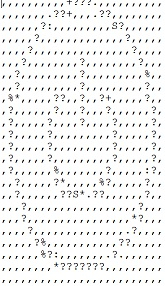
在本文中,我们想要将给定图像转换为文本基础图像(也称为 ASCII 图像)。
下面是 Python 程序,它将获取输入图像和各种函数,将其转换为灰度图片,然后应用 ASCII 字符创建不同的图案,插入图像。最后,电子邮件是基于文本的图像,这是一系列平面 ASCII 字符。
示例
from PIL import Image
import os
ASCII_CHARS = [ '#', '?', '%', '.', 'S', '+', '.', '*', ':', ',', '@']
def resize_image(image, new_width=25):
   (input__width, input__height) = image.size
   aspect_ratio = input__height/float(input__width)
   changed_height = int(aspect_ratio * new_width)
   changed_image = image.resize((new_width, changed_height))
   return changed_image
def make_grey(image):
   return image.convert('L')
def pixel_to_ascii(image, range_width=25):
   pixels_in_image = list(image.getdata())
   pixels_to_chars = [ASCII_CHARS[pixel_value//range_width] for pixel_value in
   pixels_in_image]
   return "".join(pixels_to_chars)
def image_to_ascii(image, new_width=25):
   image = resize_image(image)
   image = make_grey(image)
   pixels_to_chars = pixel_to_ascii(image)
   len_pixels_to_chars = len(pixels_to_chars)
   image_ascii = [pixels_to_chars[index: index + new_width] for index in
   range(0, len_pixels_to_chars, new_width)]
   return "\n".join(image_ascii)
def convert_image(image_filepath):
   # image = None
   try:
      image = Image.open(image_filepath)
   except Exception as e:
      print("Unable to open image file          {image_filepath}.".format(image_filepath=image_filepath))
   print(e)
   return
   image_ascii = image_to_ascii(image)
   f = open(os.path.splitext(image_filepath)[0]+'.txt','w')
   f.write(image_ascii)
   f.close()
convert_image('D:\button.jpg')
输出
运行上述代码得到以下结果 −
输入图像

输出图像
相关文章
有用资源
python 参考教程 - 该教程包含有关 python 的更多信息:https://www.cainiaomax.com/python/

