
使用 CSS 图像雪碧图创建导航菜单
cssweb developmentfront end technology更新于 2025/12/10 15:08:17
图像雪碧图用于减少 http 请求数量,从而加快网站的加载速度。
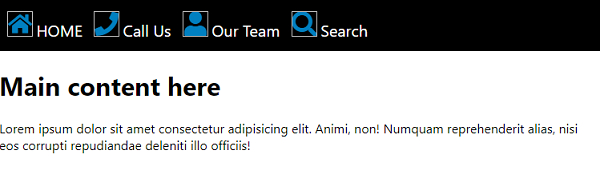
以下是使用 CSS 图像雪碧图创建导航菜单的代码 −
示例
<!DOCTYPE html>
<html>
<head>
<style>
body {
   font-family: "Segoe UI", Tahoma, Geneva, Verdana, sans-serif;
   margin: 0px;
}
span {
   width: 200px;
   height: 300px;
   background-color: black;
}
nav {
   background-color: black;
   height: 50px;
   padding-top: 15px;
   padding-left: 10px;
}
nav a {
   font-size: 20px;
   color: white;
   text-decoration: none;
   margin-right: 10px;
}
.home {
   width: 32px;
   height: 32px;
   background: url("css_sprites.png") -62px -62px;
}
.search {
   width: 32px;
   height: 32px;
   background: url("css_sprites.png") -10px -62px;
}
.phone {
   width: 32px;
   height: 32px;
   background: url("css_sprites.png") -62px -10px;
}
.user {
   width: 32px;
   height: 32px;
   background: url("css_sprites.png") -10px -10px;
}
</style>
</head>
<body>
<nav>
<img class="home" />
<a href="">HOME</a>
<img class="phone" />
<a href="">Call Us</a>
<img class="user" />
<a href="">Our Team</a>
<img class="search" />
<a href="">Search</a>
</nav>
<h1>
Main content here
</h1>
<p>Lorem ipsum dolor sit amet consectetur adipisicing elit. Animi, non! Numquam
reprehenderit alias, nisi eos corrupti repudiandae deleniti illo officiis!</p>
</body>
</html>
输出
上述代码将产生以下输出 −
相关文章
有用资源
css 参考教程 - 该教程包含有关 css 的更多信息:https://www.cainiaomax.com/css/

