
CSS 边距属性
cssweb developmentfront end technology更新于 2025/1/14 13:00:17
CSS 边距属性是 margin-top、margin-right、margin-bottom 和 margin-left 的简写。它使我们能够指定元素周围的空间。我们也可以设置各个边距。
语法
CSS 边距属性的语法如下 −
Selector {
   margin: /*value*/
}
示例
以下示例说明了 CSS 边距属性 −
<!DOCTYPE html>
<html>
<head>
<style>
div {
   margin: 10px 50px 20px;
   padding: 1rem;
   border: dashed;
}
p {
   text-align: center;
}
#demo {
   margin-left: -80px;
   box-shadow: inset 0 0 10px brown;
}
</style>
</head>
<body>
<div></div>
<p>This is demo text.</p>
<p id="demo">Another demo text.</p>
<p>This is new demo text.</p>
</body>
</html>
输出
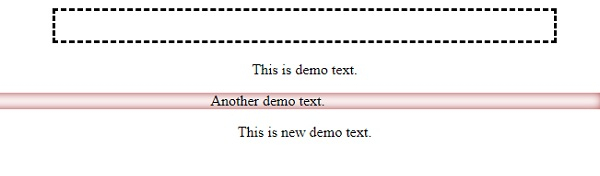
这将给出以下输出 −
示例
<!DOCTYPE html>
<html>
<head>
<style>
ul {
   margin: auto;
   background-image: linear-gradient(to right, khaki, aliceblue, skyblue, rebeccapurple);
   width: 20em;
}
li {
   margin-top: 3px;
}
li + li {
   margin-left: -20px;
}
li:last-child {
   margin-left: 75px;
}
</style>
</head>
<body>
<h2>Demo Heading</h2>
<ul>
<li>This is demo list item.</li>
<li>This is another list item with different style.</li>
<li>This is our third demo text with another style.
</li>
</ul>
</body>
</html>
Outline
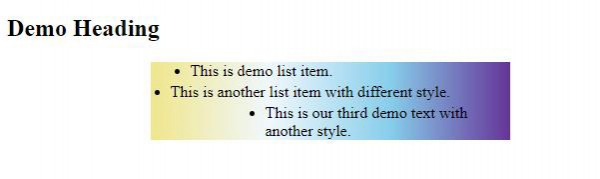
这将给出以下输出 −
相关文章
有用资源
css 参考教程 - 该教程包含有关 css 的更多信息:https://www.cainiaomax.com/css/

