
CSS overflow: scroll
cssweb developmentfront end technology更新于 2024/4/17 22:04:17
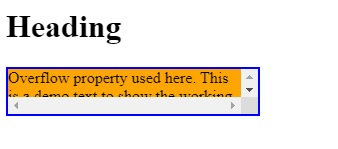
CSS overflow 属性的值为 scroll 时,溢出部分会被裁剪,并添加一个滚动条。这样用户就可以阅读所有内容。
示例
您可以尝试运行以下代码来实现 CSS overflow: scroll 属性 −
<!DOCTYPE html>
<html>
   <head>
      <style>
         div {
            background-color: orange;
            width: 250px;
            height: 45px;
            border: 2px solid blue;
            overflow: scroll;
         }
      </style>
   </head>
   <body>
      <h1>Heading</h1>
      <div>Overflow property used here. This is a demo text to show the working of CSS overflow: scroll. This won't hide the content. Now a scrollbar will be visible.</div>
   </body>
</html>
输出
相关文章
有用资源
css 参考教程 - 该教程包含有关 css 的更多信息:https://www.cainiaomax.com/css/

