
使用 ::file-selector-button 选择器设置文件上传按钮的 CSS 样式
cssweb developmentfront end technology更新于 2024/5/16 1:48:17
我们可以使用 CSS 伪元素 ::file-selector-button 设置文件上传按钮的样式。但是,该伪元素的完全支持仅限于 Firefox 和 Firefox Android。
::-webkit-file-upload-button 用于支持 Safari、Chrome 和 Opera。
语法
CSS file-selector 属性的语法如下 −
Selector::file-selector-button {
   attribute: /*value*/
}
Selector::-webkit-file-upload-button {
   attribute: /*value*/
}
示例
以下示例说明了 CSS 文件选择器按钮选择器。
<!DOCTYPE html>
<html>
<head>
   <style>
   input[type=file]::file-selector-button:hover {
      cursor: grab;
      background-color: blueviolet;
      color: white;
      font-size: 1.2em;
      box-shadow: inset 5px 10px 10px cornflowerblue;
   }
</style>
</head>
   <body>
      <form>
         <label for="fup">Click to</label>
         <input type="file" id="fup" />
         <input type="text" placeholder="Random Text here" />
         <button type="submit">Done</button>
      </form>
   </body>
</html>
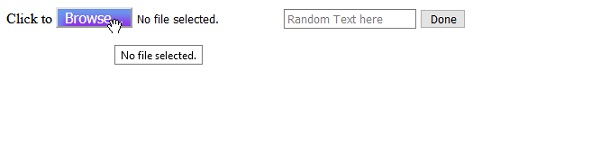
这在 Firefox 网络浏览器中提供以下输出。
示例
<!DOCTYPE html>
<html>
<head>
   <style>
      input[type=file]::file-selector-button:hover {
         cursor: pointer;
         background-color: crimson;
         font-size: 1.2em;
         border-radius: 25%;
         box-shadow: inset 5px 10px 10px cornsilk;
      }
      input[type=file]::-webkit-file-upload-button:hover {
         cursor: pointer;
         background-color: crimson;
         font-size: 1.2em;
         border-radius: 25%;
         box-shadow: inset 5px 10px 10px cornsilk;
      }
   </style>
</head>
   <body>
      <form>
         <label for="fup">Click to</label>
         <input type="file" id="fup" />
         <input type="text" placeholder="using webkit prefix" />
         <button type="submit">Done</button>
      </form>
   </body>
</html>
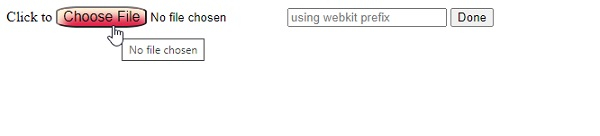
这在 Google Chrome 中给出了以下输出。
相关文章
有用资源
css 参考教程 - 该教程包含有关 css 的更多信息:https://www.cainiaomax.com/css/

