
CSS 更新 - 用于设置文本装饰和下划线样式的新属性
cssweb developmentfront end technology更新于 2024/5/16 12:28:17
通过引入以下文本装饰属性,我们现在可以比以前更轻松地设置文本样式。text-decoration 是 text-decoration-thickness、text-decoration-color、text-decoration-line 和 text-decoration-style 的简写。text-decoration-skip、text-decoration-skip-ink、text-decoration、text-underline-offset 和 text-underline-position 需要明确指定。
语法
CSS 文本装饰的语法如下 −
Selector {
   text-decoration: /*value*/
}
示例
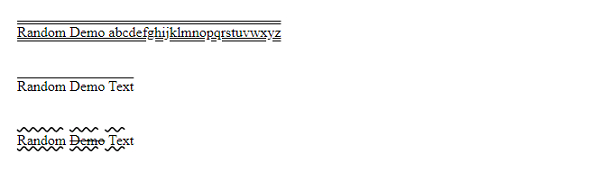
以下示例说明了 CSS 文本装饰属性。
<!DOCTYPE html>
<html>
   <head>
      <style>
         #one {
            text-decoration-style: double;
            text-decoration-skip-ink: auto;
         }
         p {
            padding: 2%;
            text-decoration-line: underline overline;
            text-decoration-style: wavy;
         }
         p:nth-of-type(even) {
            text-decoration: overline;
         }
         span {
            text-decoration: line-through;
         }
      </style>
   </head>
   <body>
      <p id="one">Random Demo abcdefghijklmnopqrstuvwxyz</p>
      <p>Random Demo Text</p>
      <p>Random <span>Demo</span> Text</p>
   </body>
</html>
这将给出以下输出
示例
<!DOCTYPE html>
<html>
   <head>
      <style>
         p {
            margin: 3%;
            font-size: x-large;
            text-decoration-line: underline overline;
            text-decoration-style: dotted;
            text-decoration-skip-ink: none;
            text-decoration-thickness: 4px;
         }
      </style>
   </head>
   <body>
      <p>Super Demo abcdefghijklmnopqrstuvwxyz</p>
   </body>
</html>
这将给出以下输出

相关文章
有用资源
css 参考教程 - 该教程包含有关 css 的更多信息:https://www.cainiaomax.com/css/

