
CSS3 多列 column-span 属性
cssweb developmentfront end technology更新于 2024/3/24 4:28:17
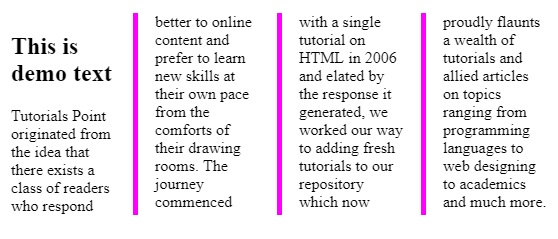
column-span 属性用于指定列之间的跨度。您可以尝试运行以下代码,使用 CSS − 实现 column-span 属性。
示例
<html>
<head>
<style>
   .multi {
      /* 列数属性 */
      -webkit-column-count: 4;
      -moz-column-count: 4;
      column-count: 4;

      /* 列间隙属性 */
      -webkit-column-gap: 40px;
      -moz-column-gap: 40px;
      column-gap: 40px;

      /* 列样式属性 */
      column-rule-style: solid;
      column-rule-color: #ff00ff;

      /* 列宽度属性 */
      -webkit-column-rule-width: 5px;
      -moz-column-rule-width: 5px;
      column-rule-width: 5px;

      /* 列跨度属性 */
      -webkit-column-span: all; /* Chrome, Safari, Opera */
      column-span: all;
   }
</style>
</head>

<body>
<div class = "multi">
<h2>This is demo text</h2>
   Tutorials Point originated from the idea that there exists a class of readers
   who respond better to online content and prefer to learn new skills at their
   own pace from the comforts of their drawing rooms. The journey commenced with
   a single tutorial on HTML in 2006 and elated by the response it generated, we
   worked our way to adding fresh tutorials to our repository which now proudly
   flaunts a wealth of tutorials and allied articles on topics ranging from
   programming languages to web designing to academics and much more.
</div>
</body>
</html>
输出
相关文章
有用资源
css 参考教程 - 该教程包含有关 css 的更多信息:https://www.cainiaomax.com/css/

