
确定如何使用 CSS 将未显示的溢出内容向用户发出信号
cssweb developmentfront end technology更新于 2024/3/12 11:24:17
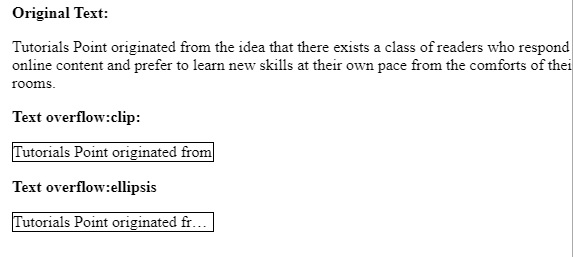
text-overflow 属性用于确定如何使用 CSS 将未显示的溢出内容向用户发出信号。
示例
您可以尝试运行以下代码,在 CSS 中实现 text-overflow 属性:
<html>
   <head>
      <style>
         p.text1 {
            white-space: nowrap;
            width: 200px;
            border: 1px solid #000000;
            overflow: hidden;
            text-overflow: clip;
         }
         p.text2 {
            white-space: nowrap;
            width: 200px;
            border: 1px solid #000000;
            overflow: hidden;
            text-overflow: ellipsis;
         }
      </style>
   </head>
   <body>
      <b>Original Text:</b>
      <p>Tutorials Point originated from the idea that there exists a class of
      readers who respond better to online content and prefer to learn new skills at
      their own pace from the comforts of their drawing rooms.</p>
      <b>Text overflow:clip:</b>

      <p class = "text1">Tutorials Point originated from the idea that there exists
      a class of readers who respond better to online content and prefer to learn
      new skills at their own pace from the comforts of their drawing rooms.</p>
      <b>Text overflow:ellipsis</b>

      <p class = "text2">Tutorials Point originated from the idea that there exists
      a class of readers who respond better to online content and prefer to learn
      new skills at their own pace from the comforts of their drawing rooms.</p>
   </body>
</html>
输出
相关文章
有用资源
css 参考教程 - 该教程包含有关 css 的更多信息:https://www.cainiaomax.com/css/

