
Django – 制作联系表单并存储其数据,无需模型、查询和 html
pythonserver side programmingprogramming更新于 2025/10/1 5:32:17
在 Django 中,您可以非常轻松地创建联系表单,但需要管理很多事情,例如制作表单、视图、模型,然后在 Admin 中注册模型等。在本文中,我们将了解如何为我们的联系表单使用预定义包,它将数据保存在预定义模型中。
我们将制作一个联系表单,它将数据存储在模型中,而无需在 models.py 或 views.py 中编写任何代码或编写任何 html。那么,让我们开始吧。
示例
首先,创建一个 Django 项目和一个应用程序。
安装 django-contactforms 包 −
pip install django-contactforms
然后,在 settings.py 中添加以下行 −
INSTALLED_APPS+=["contactforms"]
在 INSTALLED_APPS 中添加此模块和您的应用程序名称。
在项目的 urls.py 中 −
from django.contrib import admin
from django.urls import path,include

urlpatterns = [
   path('admin/', admin.site.urls),
   path('', include('contactforms.urls')),
   path("aftercontact", include('MyForm.urls'))
]
创建两个 URL 端点,一个用于联系表单,另一个用于提交后重定向。
在应用程序的 urls.py 中 −
from django.urls import path,include
from . import views
urlpatterns = [
   path('',views.home,name="home"),
]
在这里,我们呈现了填写联系表单后将显示的 html。
在 views.py 中 −
from django.shortcuts import render
# 在此处创建您的视图。
def home(request):
   return render(request,"home.html")
这里我们渲染了 html。
现在,在 App 目录中创建一个文件夹,并将其命名为 "templates"。 在其中添加一个文件夹,并将其命名为 "contact",并在其中添加一个 html 文件,并将其命名为 contact.html。 在 contact.html 中添加以下几行。
<!DOCTYPE html>
<html>
   <body>
      <div class="row">
      <form action="{% url 'contact' %}" method="post">
      <h3>Send a Message</h3>
      {% csrf_token %}
      <div class="form-group">
         {% if messages %}
         {% for message in messages %}
         <span{% if message.tags %} class="{{ message.tags } }"{% endif %} style="color: green">
            {{ message }}
         </span>
         {% endfor %}
            {% endif %}
      </div>
      <div class="form-group">
         {{ forms.name }}
      </div>
      <div class="form-group">
         {{ forms.email }}
      </div>
      <div class="form-group">
         {{ forms.subject }}
      </div>
      <div class="form-group">
         {{ forms.message }}
      </div>
      <button class="btn btnprimary" type="submit">Submit</button>
   </form>
   </div>
   </body>
</html>
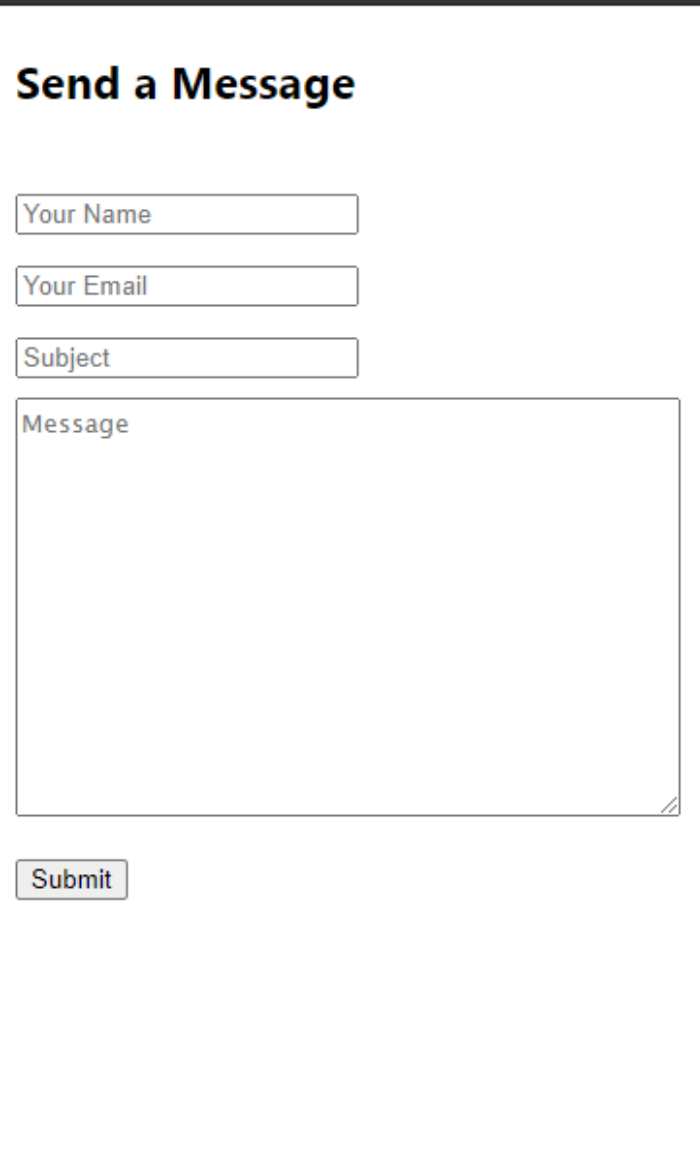
这是将在"/"端点上显示的表单。我们只是从包中加载了表单。
现在返回 templates 文件夹并添加 home.html(不在 contact 文件夹中)并添加以下行 −
<!DOCTYPE html>
<html>
   <head><title>tut</title></head>
   <body>
      <h3>Successfull</h3>
   </body>
</html>
输出
这是提交联系表单后呈现的 html。
相关文章
有用资源
python 参考教程 - 该教程包含有关 python 的更多信息:https://www.cainiaomax.com/python/

