
解释 JavaFX 中 2D 形状的填充属性
javaobject oriented programmingprogramming更新于 2025/10/12 0:12:17
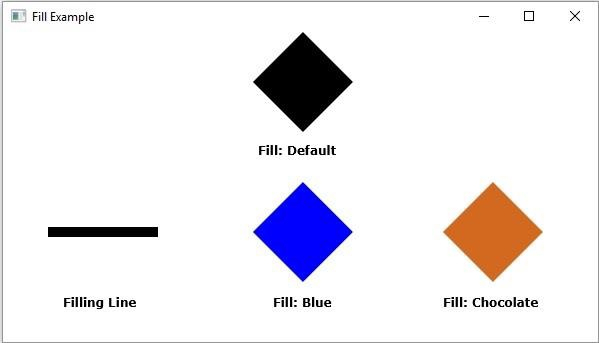
填充属性指定/定义要填充形状内部区域的颜色。您可以使用 javafx.scene.shape.Shape 类的 fill() 方法用所需颜色填充特定形状。
默认情况下,形状(对象)线、路径和折线的此属性值为 Color.BLACK,对于所有其余形状,此属性的默认值为 null,即它们将不填充任何颜色(它们将保持不透明)。
示例
import javafx.application.Application;
import javafx.scene.Group;
import javafx.scene.Scene;
import javafx.scene.paint.Color;
import javafx.scene.shape.Line;
import javafx.scene.shape.Polygon;
import javafx.scene.text.Font;
import javafx.scene.text.FontPosture;
import javafx.scene.text.FontWeight;
import javafx.scene.text.Text;
import javafx.stage.Stage;
public class FillExample extends Application {
   public void start(Stage stage) {
      Font font = Font.font("verdana", FontWeight.BOLD, FontPosture.REGULAR, 12);
      Text label1 = new Text("Fill: Default");
      label1.setFont(font);
      label1.setX(260.0);
      label1.setY(125.0);
      Polygon rhombus1 = new Polygon(300.0, 0.0, 250.0, 50.0, 300.0, 100.0, 350.0, 50.0);
      Text label2 = new Text("Filling Line");
      label2.setFont(font);
      label2.setX(60.0);
      label2.setY(275.0);
      //Constructing a line
      Line line = new Line();
      line.setStartX(50.0);
      line.setStartY(200.0);
      line.setEndX(150.0);
      line.setEndY(200.0);
      line.setStrokeWidth(10.0);
      line.setFill(Color.DARKBLUE);
      Text label3 = new Text("Fill: Blue");
      label3.setFont(font);
      label3.setX(270.0);
      label3.setY(275.0);
      Polygon rhombus3 = new Polygon(300.0, 150.0, 250.0, 200.0, 300.0, 250.0, 350.0, 200.0);
      rhombus3.setFill(Color.BLUE);
      Text label4 = new Text("Fill: Chocolate");
      label4.setFont(font);
      label4.setX(440.0);
      label4.setY(275.0);
      Polygon rhombus4 = new Polygon(490.0, 150.0, 440, 200.0, 490.0, 250.0, 540.0, 200.0);
      rhombus4.setFill(Color.CHOCOLATE);
      //创建一个 Group 对象
      Group root = new Group(label1, label2, label3, label4, rhombus1, line, rhombus3, rhombus4);
      //创建一个 scene 对象
      Scene scene = new Scene(root, 595, 310);
      //设置 Stage 标题
      stage.setTitle("Fill Example");
      //将 scene 添加到 stage
      stage.setScene(scene);
      //显示舞台内容
      stage.show();
   }
   public static void main(String args[]){
      launch(args);
   }
}
输出
相关文章
有用资源
java 参考教程 - 该教程包含有关 java 的更多信息:https://www.cainiaomax.com/java/

