
解释 JavaFX 中 2D 形状的平滑属性
javaobject oriented programmingprogramming更新于 2025/10/12 2:52:17
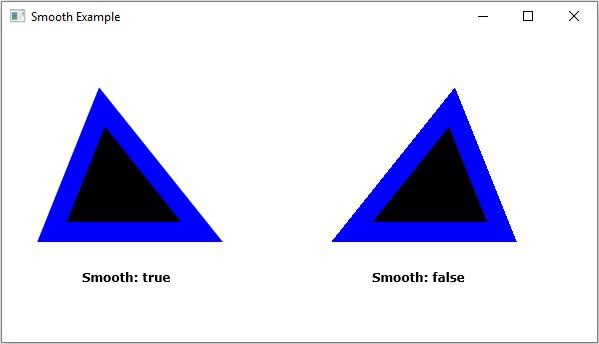
平滑属性指定是否使用抗锯齿提示。您可以使用 javafx.scene.shape.Shape 类的 setSmooth() 方法将值设置为此属性。
此方法接受布尔值,如果您传递 true,则形状的边缘将被平滑。
示例
import javafx.application.Application;
import javafx.scene.Group;
import javafx.scene.Scene;
import javafx.scene.paint.Color;
import javafx.scene.shape.Polygon;
import javafx.scene.shape.StrokeLineJoin;
import javafx.scene.text.Font;
import javafx.scene.text.FontPosture;
import javafx.scene.text.FontWeight;
import javafx.scene.text.Text;
import javafx.stage.Stage;
public class SmoothExample extends Application {
   public void start(Stage stage) {
      Font font = Font.font("verdana", FontWeight.BOLD, FontPosture.REGULAR, 12);
      Text label2 = new Text("Smooth: true");
      label2.setFont(font);
      label2.setX(80.0);
      label2.setY(250.0);
      Polygon shape1 = new Polygon(100.0, 75.0, 50.0, 200.0, 200.0, 200.0);
      shape1.setStroke(Color.BLUE);
      shape1.setStrokeWidth(20);
      shape1.setStrokeLineJoin(StrokeLineJoin.MITER);
      shape1.setSmooth(true);
      Text label3 = new Text("Smooth: false");
      label3.setFont(font);
      label3.setX(370.0);
      label3.setY(250.0);
      Polygon shape2 = new Polygon(450.0, 75.0, 350.0, 200.0, 500.0, 200.0);
      shape2.setStroke(Color.BLUE);
      shape2.setStrokeWidth(20.0);
      shape2.setStrokeLineJoin(StrokeLineJoin.MITER);
      shape2.setSmooth(false);
      //创建一个 Group 对象
      Group root = new Group(label2, label3, shape1, shape2);
      //创建一个 scene 对象
      Scene scene = new Scene(root, 595, 310);
      //设置 Stage 标题
      stage.setTitle("Smooth Example");
      //将 scene 添加到 stage
      stage.setScene(scene);
      //显示 stage 的内容
      stage.show();
   }
   public static void main(String args[]){
      launch(args);
   }
}
输出
相关文章
有用资源
java 参考教程 - 该教程包含有关 java 的更多信息:https://www.cainiaomax.com/java/

