
CSS 中的字体大小
cssweb developmentfront end technology更新于 2025/2/6 13:32:17
CSS 的 font-size 属性用于设置字体大小。我们可以用百分比、像素、厘米、点、em 等单位以及 absolute 关键字来指定值。相对值可以最大化可访问性。默认的 font-size 为 16px 或 12pt。
语法
CSS font-size 属性的语法如下 −
Selector {
   font-size: /*value*/
}
以下示例说明了 CSS font-size 属性 −
示例
<!DOCTYPE html>
<html>
<head>
<style>
div {
   margin: auto;
   padding: 10px;
   text-align: center;
   width: 50%;
   border: 2px solid;
   border-radius: 15%;
   font-size: 1.4em;
}
</style>
</head>
<body>
<div>
one
<div>two
<div>three</div>
</div>
</div>
</body>
</html>
输出
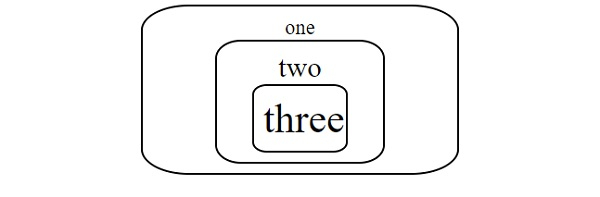
这将给出以下输出 −
示例
<!DOCTYPE html>
<html>
<head>
<style>
p {
   font-size: smaller;
}
#demo {
   font-size: initial;
}
p:last-of-type {
   font-size: 200%;
}
</style>
</head>
<body>
<h2>Demo Heading</h2>
<p>This is demo text 1.</p>
<p id="demo">This is demo text 2. </p>
<p>This is demo text 3.</p>
</body>
</html>
输出
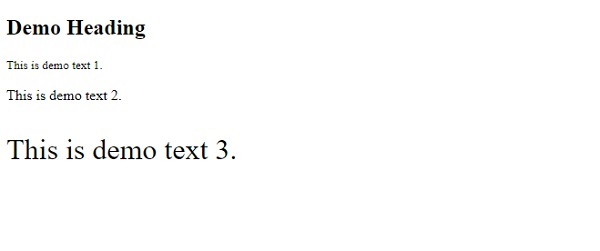
这将给出以下输出 −
相关文章
有用资源
css 参考教程 - 该教程包含有关 css 的更多信息:https://www.cainiaomax.com/css/

