
使用 CSS appearance 隐藏选择输入的下拉箭头
cssweb developmentfront end technology更新于 2024/5/16 3:24:17
我们使用 appearance 属性根据用户操作系统的平台原生样式来设置元素的样式。
语法
CSS appearance 属性的语法如下 −
选择器 {
   appearance: /*value*/;
   -webkit-appearance: /*value*/; /*适用于 Safari 和 Chrome */
   -moz-appearance: /*value*/; /*适用于 Firefox */
}
示例
以下示例演示了 CSS appearance 属性。
<!DOCTYPE html>
<html>
   <head>
      <style>
         input[type=number] {
            width: 40px;
            -moz-appearance: textfield;
         }
         input[type=number]:hover {
            background-color: #e3f5a1;
         }
         input::-webkit-inner-spin-button {
            -webkit-appearance: none;
         }
      </style>
   </head>
   <body>
      <p>Type/Scroll to change value</p>
      <input type="number" value="6">
   </body>
</html>
这将给出以下输出


示例
<!DOCTYPE html>
<html>
   <head>
      <style>
         select {
            width: 20%;
            appearance: none;
            -webkit-appearance: none;
            -moz-appearance: none;
         }
      </style>
   </head>
   <body>
      Hiding dropdown arrow<br/><br/>
      <select>
         <option value="none" selected disabled hidden>
            Select color
         </option>
         <option>Red</option>
         <option>Blue</option>
         <option>Green</option>
         <option>Yellow</option>
         <option>Orange</option>
      </select>
   </body>
</html>
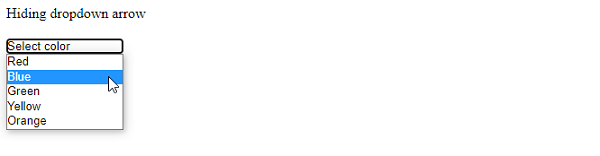
这将给出以下输出
相关文章
有用资源
css 参考教程 - 该教程包含有关 css 的更多信息:https://www.cainiaomax.com/css/

