如何在 Java 中将滚动条设置为永不出现?
java 8object oriented programmingprogramming更新于 2025/9/1 17:16:17
要将滚动条设置为永不出现,请使用 JScrollPane.HORIZONTAL_SCROLLBAR_NEVER 和 JScrollPane.VERTICAL_SCROLLBAR_NEVER。假设您创建了一个包含一些按钮组件的 Box。现在,创建一个 JScrollPane:
JScrollPane scrollPane = new JScrollPane();
将 Viewport 视图设置为 Box:
scrollPane.setViewportView(box);
现在,将滚动条设置为永不出现:
scrollPane.setHorizontalScrollBarPolicy(JScrollPane.HORIZONTAL_SCROLLBAR_NEVER); scrollPane.setVerticalScrollBarPolicy(JScrollPane.VERTICAL_SCROLLBAR_NEVER);
以下是将滚动条设置为永不出现的示例:
示例
package my;
import java.awt.BorderLayout;
import java.awt.Dimension;
import javax.swing.Box;
import javax.swing.JButton;
import javax.swing.JFrame;
import javax.swing.JScrollPane;
public class SwingDemo {
   public static void main(String args[]) {
      JFrame frame = new JFrame("Demo");
      frame.setDefaultCloseOperation(JFrame.EXIT_ON_CLOSE);
      JButton button1 = new JButton("One");
      JButton button2 = new JButton("Two");
      JButton button3 = new JButton("Three");
      JButton button4 = new JButton("Four");
      JButton button5 = new JButton("Five");
      JButton button6 = new JButton("Six");
      Box box = Box.createVerticalBox();
      box.setPreferredSize(new Dimension(900,900));
      box.add(button1);
      box.add(button2);
      box.add(button3);
      box.add(button4);
      box.add(button5);
      box.add(button6);
      JScrollPane scrollPane = new JScrollPane();
      scrollPane.setViewportView(box);
      scrollPane.setHorizontalScrollBarPolicy(JScrollPane.HORIZONTAL_SCROLLBAR_NEVER);
      scrollPane.setVerticalScrollBarPolicy(JScrollPane.VERTICAL_SCROLLBAR_NEVER);
      frame.add(scrollPane, BorderLayout.CENTER);
      frame.setSize(550, 250);
      frame.setVisible(true);
   }
}
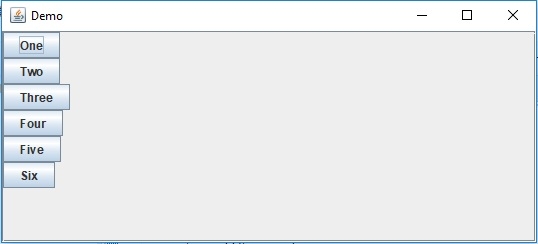
这将产生以下输出。在这里,框的首选尺寸足够大以显示滚动条,但由于我们已禁用水平和垂直滚动条并将其设置为"NEVER",因此它将不可见: