
如何使用 Tkinter 程序创建弹出窗口?
tkinterpythongui-programming更新于 2025/5/20 6:36:17
Tkinter 有许多内置函数和特性,可用于扩展应用程序的内部功能。Tkinter 中的弹出窗口是通过定义消息框创建的。为了使用弹出消息框,您必须首先通过命令"import tkinter.messagebox"在 Tkinter 中导入消息框包。
示例
在此示例中,我们将创建一个带有问题的消息框弹出窗口。单击特定选项时,它将把用户重定向到相应的操作。
# 导入所需的库
from tkinter import *
import tkinter.messagebox

# 创建 Tkinter Frame 的实例
win = Tk()

# 设置 Tkinter Frame 的几何形状
win.geometry("700x350")

def open_win():
   out = tkinter.messagebox.askquestion('Prompt', 'Do you want to Continue?')
   if out == 'yes':
      Label(win, text="Thank You for your Response!", font=('Helvetica 22 bold')).pack(pady=40)
   else:
      win.destroy()

# 创建一个按钮
button = Button(win, text="Click Me", command=open_win, font=('Helvetica 14 bold'), foreground='OrangeRed3',background="white")
button.pack(pady=50)
win.mainloop()
输出
执行上述代码后,将显示以下窗口 −
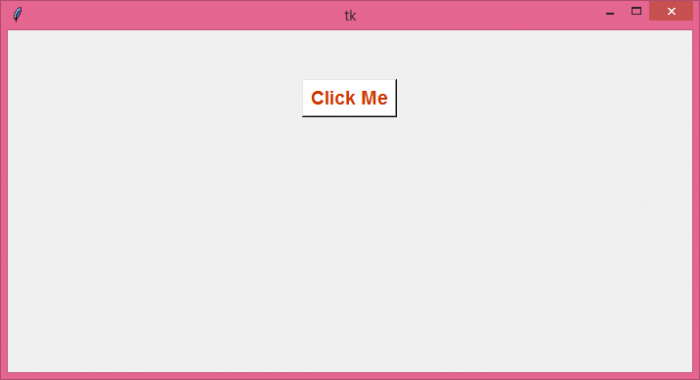
现在,单击"Click Me"按钮。它将显示一个带有问题的消息框。
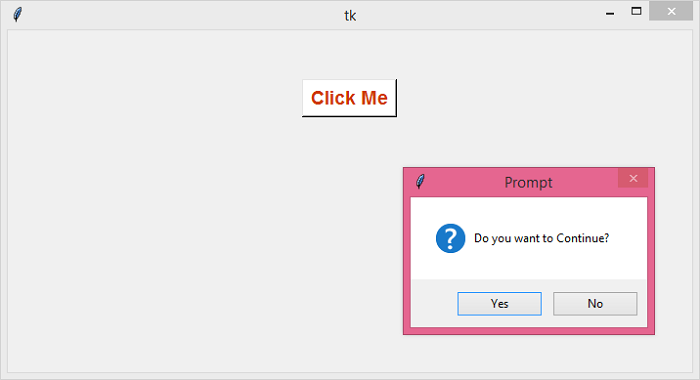
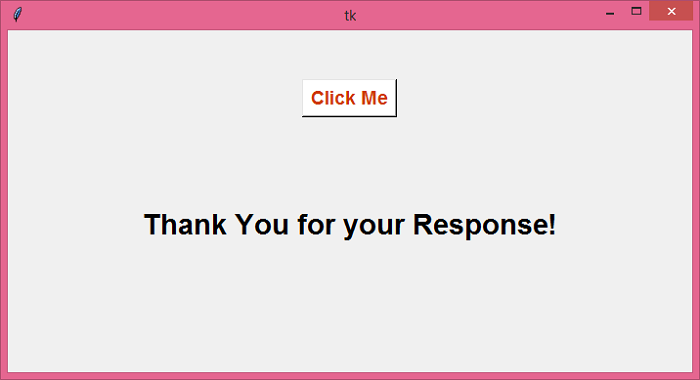
接下来,单击消息框上的"是"按钮。它将显示以下窗口 −
相关文章
有用资源
python 参考教程 - 该教程包含有关 python 的更多信息:https://www.cainiaomax.com/python/

