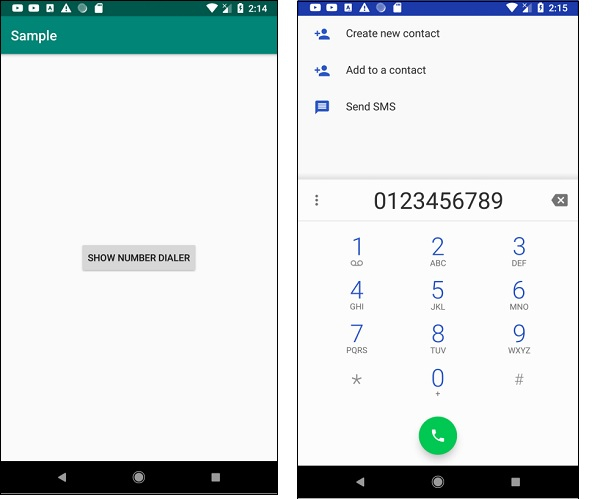
如何在 Android 系统中打开拨号器并显示电话号码?
androidapps/applicationsmobile development更新于 2026/2/16 12:52:17
此示例演示了如何在 Android 系统中打开拨号器并显示当前号码。
步骤 1 − 在 Android Studio 中创建一个新项目,前往"文件"->"新建项目",并填写所有必填信息以创建新项目。
步骤 2 − 将以下代码添加到 res/layout/activity_main.xml。
<?xml version="1.0" encoding="utf-8"?>
<RelativeLayout xmlns:android="http://schemas.android.com/apk/res/android"
   xmlns:tools="http://schemas.android.com/tools"
   android:layout_width="match_parent"
   android:layout_height="match_parent"
   android:padding="8dp"
   tools:context=".MainActivity">
<Button
   android:layout_width="wrap_content"
   android:layout_height="wrap_content"
   android:layout_centerInParent="true"
   android:layout_marginTop="40dp"
   android:onClick="ShowDialer"
   android:text="Show Number Dialer" />
<TextView
   android:layout_width="match_parent"
      android:layout_height="wrap_content"
   android:autoLink="phone"
   android:linksClickable="true" />
</RelativeLayout>
步骤 3 − 将以下代码添加到 src/MainActivity.java
import androidx.appcompat.app.AppCompatActivity;
import android.content.Intent;
import android.net.Uri;
import android.os.Bundle;
import android.view.View;
public class MainActivity extends AppCompatActivity {
   @Override
   protected void onCreate(Bundle savedInstanceState) {
      super.onCreate(savedInstanceState);
      setContentView(R.layout.activity_main);
   }
   public void ShowDialer(View view) {
      Intent intent = new Intent(Intent.ACTION_DIAL);
      intent.setData(Uri.parse("tel:0123456789"));
      startActivity(intent);
   }
}
步骤 4 − 将以下代码添加到 androidManifest.xml
<?xml version="1.0" encoding="utf-8"?>
<manifest xmlns:android="http://schemas.android.com/apk/res/android"
   package="app.com.sample">
   <uses-permission android:name="android.permission.CALL_PHONE" />
      <application
         android:allowBackup="true"
         android:icon="@mipmap/ic_launcher"
         android:label="@string/app_name"
         android:roundIcon="@mipmap/ic_launcher_round"
         android:supportsRtl="true"
         android:theme="@style/AppTheme">
         <activity android:name=".MainActivity">
            <intent-filter>
               <action android:name="android.intent.action.MAIN" />
               <category android:name="android.intent.category.LAUNCHER" />
            </intent-filter>
         </activity>
   </application>
</manifest>
让我们尝试运行您的应用程序。假设您已将实际的 Android 移动设备连接到电脑。要从 Android Studio 运行该应用程序,请打开项目的某个活动文件,然后点击工具栏上的"运行" 图标。选择您的移动设备作为选项,然后勾选将显示默认屏幕的移动设备。 −