
如何创建 Tkinter GUI 停止按钮来中断无限循环?
tkinterpythongui-programming更新于 2025/6/18 2:20:17
Tkinter 是一个用于创建基于 GUI 的应用程序的 Python 库。假设我们必须创建一个功能应用程序,其中在循环中定义特定函数。递归函数将在标签小部件中无限次显示一些文本。
要停止此递归函数,我们可以定义一个函数,该函数在单击按钮时更改条件。可以通过声明一个可以为 True 或 False 的全局变量来更改条件。
示例
# 导入所需的库
from tkinter import *

# 创建 tkinter 框架的实例
win= Tk()

# 设置 Tkinter 窗口的大小
win.geometry("700x350")

# 定义一个函数在无限循环内打印某些内容
run= True

def print_hello():
   if run:
      Label(win, text="Hello World", font= ('Helvetica 10 bold')).pack()
   # 1 秒后再次调用 print_hello()
   win.after(1000, print_hello)
def start():
   global run
   run= True

def stop():
   global run
   run= False

# 创建按钮来触发循环的开始和结束
start= Button(win, text= "Start", command= start)
start.pack(padx= 10)
stop= Button(win, text= "Stop", command= stop)
stop.pack(padx= 15)

# 1 秒后调用 print_hello() 函数。
win.after(1000, print_hello)
win.mainloop()
输出
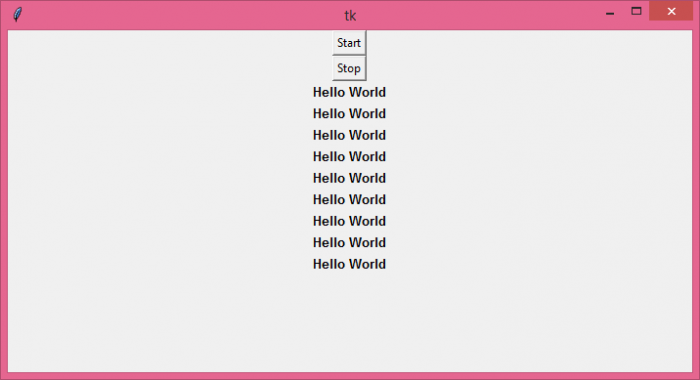
现在,每当我们点击"停止"按钮时,它就会停止调用该函数。
相关文章
有用资源
python 参考教程 - 该教程包含有关 python 的更多信息:https://www.cainiaomax.com/python/

