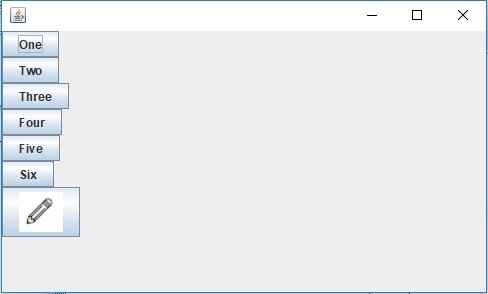
如何在 Java 中向 JButton 添加图标?
java 8object oriented programmingprogramming更新于 2025/9/18 2:20:17
要向按钮添加图标,请使用 Icon 类,它允许您向按钮添加图像。
我们正在创建一个按钮,其中我们使用 Icon 类 − 添加图标
Icon icon = new ImageIcon("E:\editicon.PNG");
JButton button7 = new JButton(icon);
上面,我们为按钮 7 设置了图标。
以下是向 JButton 添加图标的示例 −
示例
package my;
import javax.swing.Box;
import javax.swing.Icon;
import javax.swing.ImageIcon;
import javax.swing.JButton;
import javax.swing.JFrame;
public class SwingDemo {
   public static void main(String[] args) {
      JButton button1 = new JButton("One");
      JButton button2 = new JButton("Two");
      JButton button3 = new JButton("Three");
      JButton button4 = new JButton("Four");
      JButton button5 = new JButton("Five");
      JButton button6 = new JButton("Six");
      Icon icon = new ImageIcon("E:\editicon.PNG");
      JButton button7 = new JButton(icon);
      Box box = Box.createVerticalBox();
      box.add(button1);
      box.add(button2);
      box.add(button3);
      box.add(button4);
      box.add(button5);
      box.add(button6);
      box.add(button7);
      JFrame frame = new JFrame();
      frame.add(box);
      frame.setDefaultCloseOperation(JFrame.EXIT_ON_CLOSE);
      frame.setLocationByPlatform(true);
      frame.setSize(500, 300);
      frame.setVisible(true);
   }
}
输出