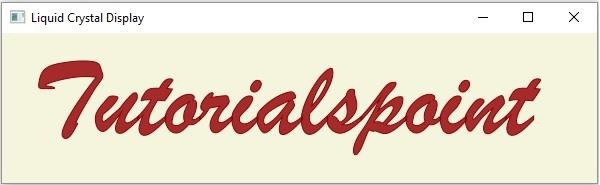
如何在 JavaFX 中为文本添加 LCD(液晶显示)?
javafxobject oriented programmingprogramming更新于 2026/1/3 16:12:17
javafx.scene.text.Text 类具有一个名为 fontSmoothingType 的属性,该属性指定文本的平滑类型。您可以使用设置 setFontSmoothingType() 方法将值设置为此属性,该方法接受两个参数 −
FontSmoothingType.GRAY − 这指定默认的灰度平滑。
FontSmoothingType.LCD − 这指定 LCD 平滑。这利用了 LCD 显示器的特性,并增强了节点的平滑度。
要将 LCD 显示器添加到文本 −
通过实例化 javafx.scene.text.Text 类来创建文本节点。
使用 javafx.scene.text.Font 类的 font() 方法之一创建所需的字体。
使用 setText() 方法将字体设置为文本。
通过将 FontSmoothingType.LCD 作为参数传递给 setFontSmoothingType() 方法,将 LCD 平滑类型设置为文本。
示例
import java.io.FileNotFoundException;
import javafx.application.Application;
import javafx.scene.Group;
import javafx.scene.Scene;
import javafx.scene.paint.Color;
import javafx.stage.Stage;
import javafx.scene.text.Font;
import javafx.scene.text.FontSmoothingType;
import javafx.scene.text.FontWeight;
import javafx.scene.text.Text;
public class LCDTextExample extends Application {
   public void start(Stage stage) throws FileNotFoundException {
      //创建文本对象
      String str = "Tutorialspoint";
      Text text = new Text(30.0, 100.0, str);
      //设置字体
      Font font = Font.font("Brush Script MT", FontWeight.BOLD, 110);
      text.setFont(font);
      //设置文本颜色
      text.setFill(Color.BLUEVIOLET);
      //设置液晶显示到文本
      text.setFontSmoothingType(FontSmoothingType.LCD);
      //设置文本的颜色
      text.setFill(Color.BROWN);
      //设置描边的宽度和颜色
      text.setStrokeWidth(1);
      text.setStroke(Color.DARKRED);
      //设置舞台
      Group root = new Group(text);
      Scene scene = new Scene(root, 595, 150, Color.BEIGE);
      stage.setTitle("Liquid Crystal Display");
      stage.setScene(scene);
      stage.show();
   }
   public static void main(String args[]){
      launch(args);
   }
}
输出