如何在 JavaFX 中将线性渐变(颜色)应用于节点?
javafxobject oriented programmingprogramming更新于 2026/1/4 1:16:17
您可以使用 setFill() 方法将颜色应用于 JavaFX 中的形状,该方法会将颜色添加到几何形状或背景的内部。
此方法接受 javafx.scene.paint.Paint 类的对象作为参数。它是用于用颜色填充形状和背景的颜色和渐变的基类。
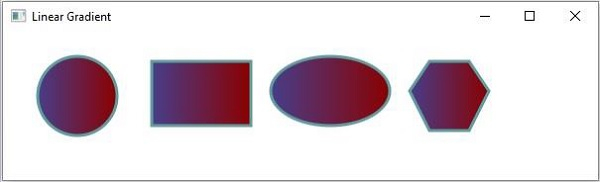
JavaFX 中的 javafx.scene.paint.LinearGradient 类是 Paint 的子类,使用它可以用圆形线性渐变图案填充形状。
要将径向渐变图案应用于几何形状 −
通过传递所需参数来实例化 LinearGradient 类。
使用 setFill() 方法将创建的渐变设置为形状。
示例
import javafx.application.Application;
import javafx.scene.Group;
import javafx.scene.Scene;
import javafx.scene.paint.Color;
import javafx.scene.paint.CycleMethod;
import javafx.scene.paint.LinearGradient;
import javafx.scene.paint.Stop;
import javafx.stage.Stage;
import javafx.scene.shape.Circle;
import javafx.scene.shape.Ellipse;
import javafx.scene.shape.Polygon;
import javafx.scene.shape.Rectangle;
public class LinearGradientExample extends Application {
   public void start(Stage stage) {
      //Drawing a circle
      Circle circle = new Circle(75.0f, 65.0f, 40.0f );
      //Drawing a Rectangle
      Rectangle rect = new Rectangle(150, 30, 100, 65);
      //Drawing an ellipse
      Ellipse ellipse = new Ellipse(330, 60, 60, 35);
      //Drawing Polygon
      Polygon poly = new Polygon(410, 60, 430, 30, 470, 30, 490, 60, 470, 100, 430, 100 );
      //Setting the linear gradient
      Stop[] stops = new Stop[] {
         new Stop(0, Color.DARKSLATEBLUE),
         new Stop(1, Color.DARKRED)
      };
      LinearGradient gradient =
      new LinearGradient(0, 0, 1, 0, true, CycleMethod.NO_CYCLE, stops);
      //Setting the pattern
      circle.setFill(gradient);
      circle.setStrokeWidth(3);
      circle.setStroke(Color.CADETBLUE);
      rect.setFill(gradient);
      rect.setStrokeWidth(3);
      rect.setStroke(Color.CADETBLUE);
      ellipse.setFill(gradient);
      ellipse.setStrokeWidth(3);
      ellipse.setStroke(Color.CADETBLUE);
      poly.setFill(gradient);
      poly.setStrokeWidth(3);
      poly.setStroke(Color.CADETBLUE);
      //Setting the stage
      Group root = new Group(circle, ellipse, rect, poly);
      Scene scene = new Scene(root, 600, 150);
      stage.setTitle("Linear Gradient");
      stage.setScene(scene);
      stage.show();
   }
   public static void main(String args[]){
      launch(args);
   }
}
输出