
如何在 CSS 中更改文本框的占位符颜色
cssweb developmentfront end technology更新于 2024/8/27 16:12:17
使用 ::placeholder 伪元素,我们可以更改文本框的占位符文本颜色。
CSS ::placeholder 伪元素的语法如下 −
::placeholder {
    attribute: /*value*/
}
示例
以下示例说明了 CSS :: placeholder 伪元素。
<!DOCTYPE html>
<html>
<head>
<style>
input:last-child::placeholder {
   color: cornflowerblue;
}
</style>
</head>
<body>
<input type="text" placeholder="Default color" />
<input type="text" placeholder="Check my new color :D" />
</body>
</html>
输出
这将产生以下结果 −

示例
<!DOCTYPE html>
<html>
<head>
<style>
input::placeholder {
   color: fuchsia;
}
input {
   margin: 2%;
   width: 100%;
}
div {
   display: flex;
   flex-direction: column;
   margin: 3%;
   padding: 3%;
   text-align: center;
   align-items: center;
   box-shadow: inset 0 0 30px brown;
}
button {
   width: 40%;
}
</style>
</head>
<body>
<div>
<input type="text" placeholder="Normal placeholder" />
<input type="email" placeholder="somenone@somewhere.com" />
<button>dummy btn</button>
</div>
</body>
</html>
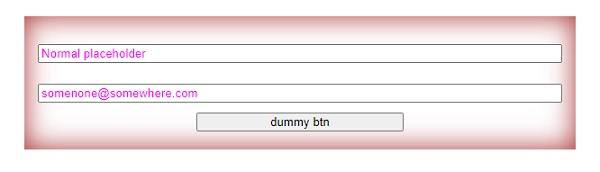
输出
这将产生以下结果 −
相关文章
有用资源
css 参考教程 - 该教程包含有关 css 的更多信息:https://www.cainiaomax.com/css/

