如何使用 JavaFX 更改图块窗格中节点的方向?
javafxobject oriented programmingprogramming更新于 2026/1/9 10:20:17
在 TilePane 布局中,节点排列为大小均匀的图块网格。您可以通过实例化 javafx.scene.layout.TilePane 类在应用程序中创建图块窗格。
方向通常是指窗格中节点的排列,它们水平或垂直排列。
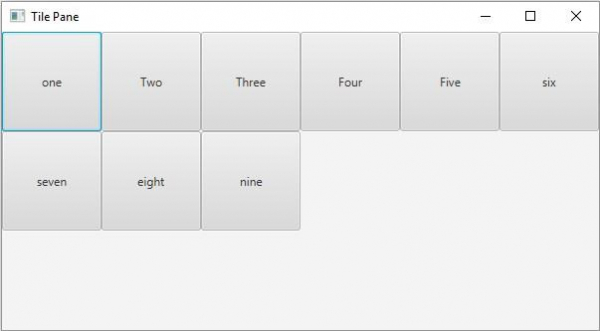
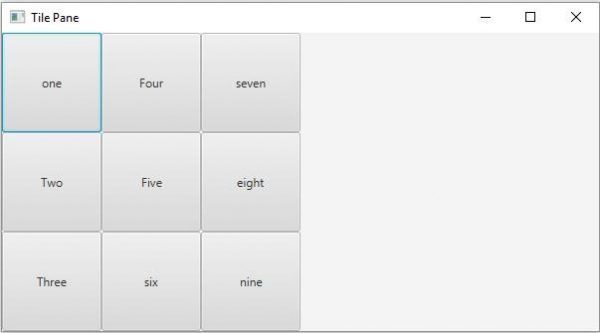
默认情况下,图块窗格的方向是水平的。您可以使用 setOrientation() 方法更改此方向。此方法接受两个值 −
Orientation.VERTICAL
Orientation.HORIZONTAL
示例
import javafx.application.Application;
import javafx.collections.ObservableList;
import javafx.geometry.Orientation;
import javafx.geometry.Pos;
import javafx.scene.Scene;
import javafx.scene.control.Button;
import javafx.scene.layout.TilePane;
import javafx.stage.Stage;
public class TilePaneOrientation extends Application {
   @Override
   public void start(Stage stage) {
      //Creating buttons
      Button one = new Button("one");
      one.setPrefSize(100, 100);
      Button two = new Button("Two");
      two.setPrefSize(100, 100);
      Button three = new Button("Three");
      three.setPrefSize(100, 100);
      Button four = new Button("Four");
      four.setPrefSize(100, 100);
      Button five = new Button("Five");
      five.setPrefSize(100, 100);
      Button six = new Button("six");
      six.setPrefSize(100, 100);
      Button seven = new Button("seven");
      seven.setPrefSize(100, 100);
      Button eight = new Button("eight");
      eight.setPrefSize(100, 100);
      Button nine = new Button("nine");
      nine.setPrefSize(100, 100);
      //Creating the tile pane
      TilePane tilePane = new TilePane();
      //Setting the orientation for the Tile Pane
      tilePane.setOrientation(Orientation.VERTICAL);
      //Setting the alignment for the Tile Pane
      tilePane.setTileAlignment(Pos.BASELINE_CENTER);
      //Setting the preferred columns for the Tile Pane
      tilePane.setPrefRows(3);
      //Retrieving the observable list of the Tile Pane
      ObservableList list = tilePane.getChildren();
      //Adding the array of buttons to the pane
      list.addAll(one, two, three, four, five, six, seven, eight, nine);
      //Setting the Scene
      Scene scene = new Scene(tilePane, 600, 300);
      stage.setTitle("Tile Pane");
      stage.setScene(scene);
      stage.show();
   }
   public static void main(String args[]){
      launch(args);
   }
}
输出
Orientation.VERTICAL
Orientation.HORIZONTAL