
如何使用 jQuery 判断数组是否为空?
概述
在 jQuery 中,我们可以使用多种方法轻松判断数组是否为空。常用方法包括 length 属性,并且由于 JavaScript 中数组是对象,因此可以使用 jQuery 别名符号 $.isEmptyObject(objName)。数组是元素的集合。因此,为了实现我们的目标,我们应该对 jQuery 的语法以及如何操作 HTML 有所了解。
需要将"$"的 isEmptyObject() 方法写入"$",因为"$"是 jQuery 的主库,其中包含各种方法,例如 isEmptyObject()、isArray()、isFunction() 等等。在所有这些方法中,对象的引用都作为参数传递,用于检查特定方法。
作用域
在本文中,我们讨论了 −
各种 jQuery 方法,例如 length 和 isEmptyObject()
对象作为参数传递。
在 jQuery 函数内初始化空数组。
语法
此部分使用的主要语法 −
使用 length 属性
arr.length
使用 isEmptyObject
$.isEmptyObject(对象名称)
在 HTML 中编写 jQuery 函数之前,我们应该在 HTML 的 <head> 标签中添加 jQuery 的 CDN 链接。
<script src="https://ajax.googleapis.com/ajax/libs/jquery/3.6.1/jquery.min.js"></script>
方法 01:在此方法中,我们将使用 length 属性检查数组是否为空。
数组的 length 属性将检查数组的长度并返回一个数字值。数组的索引从 0 开始,但长度从 1 开始计算,因此数组的长度是索引 +1。当数组不包含任何元素时,返回 0,否则返回数组的长度。
算法
步骤 1 − 创建一个 HTML <button>位于 HTML 的 body 标签内。
步骤 2 − 使用 jQuery 语法将选择器作为按钮传递,并在选定的标签上添加 click() 事件方法操作。
步骤 3 − 创建一个空数组作为 arr[ ]。
步骤 4 − 在 if-else 条件中使用 length 方法检查 array[ ] 的长度。
步骤 5 − 如果 array[ ] 的长度等于零,则返回空值;否则,如果数组的长度大于零,则返回空值。
示例
<!DOCTYPE html>
<html lang="en">
<head>
   <title>Check array empty or not using jQuery</title>
   <script src="https://ajax.googleapis.com/ajax/libs/jquery/3.6.1/jquery.min.js"></script>
   <style>
      body{
         text-align: center;
      }
   </style>
</head>
   <body>
      <p>
         <strong>Output: </strong>
         <span id="outputVal" style="padding: 4px;"></span>
      </p>
      <button>Check Array</button>

      <script>
         $("button").click(() =>
         var arr = [];
         if(arr.length==0){
            document.getElementById("outputVal").innerText="Array is empty";
            document.getElementById("outputVal").style.background="tomato";
         } else {
            document.getElementById("outputVal").innerText="Array is not empty";
            document.getElementById("outputVal").style.background="lightgreen";
         }

         })
      </script>
   </body>
</html>
方法 02:使用 isEmptyObject() 属性
isEmptyObject() 方法检查对象的属性。由于 JavaScript 中的数组也是对象,因此数组将作为参数传递给 isEmptyObject(Object Name)。isEmptyObject 的返回类型为布尔值,因此它将返回 true 或 false。如果传递给它的对象为空,则返回 true,否则返回 false。
算法
步骤 1- 创建 HTML <button>位于 HTML 的 body 标签内。
步骤 2- 使用 jQuery 语法将选择器作为按钮传递,并在所选标签上添加 click() 事件方法操作。
步骤 3- 创建一个空数组 arr[ ]。
步骤 4- 使用 isEmptyObject() 方法,并在其中传递一个数组参数 isEmptyObject(arr)。将返回值存储在变量中。
步骤 5- 在 if-else 语句中将该变量作为条件传递。如果返回 true,则输出为"数组为空",否则,如果返回 false,则输出为"数组不为空"。
示例
<!DOCTYPE html>
<html lang="en">
<head>
   <title>Check array empty or not using jQuery</title>
   <script src="https://ajax.googleapis.com/ajax/libs/jquery/3.6.1/jquery.min.js"> </script>
   <style>
      body{
         text-align: center;
      }
   </style>
</head>
   <body>
      <p>
         <strong>Output: </strong>
         <span id="outputVal" style="padding: 4px;"></span>
      </p>
      <button>Check Array</button>
      <script>
         // jQuery starts from here
         // It is necessary to write the "$" with isEmptyObject() as "$" is the main library of the jQuery which contains this method.
         $("button").click(() => {
            var arr = [];
            var res = $.isEmptyObject(arr);
            if (res) {
               document.getElementById("outputVal").innerText = "Array is empty";
               document.getElementById("outputVal").style.background = "tomato";
            } else {
               document.getElementById("outputVal").innerText = "Array is not empty";
               document.getElementById("outputVal").style.background = "lightgreen";
            }
         })
      </script>
   </body>
</html>
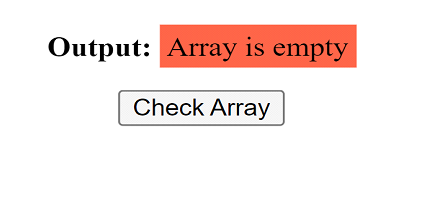
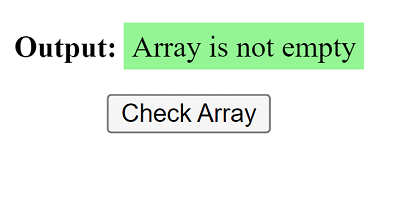
以上两种方法的输出相同
当数组为空时
<script>
   $("button").click(() => {
      var arr = [];
      var res = $.isEmptyObject(arr);
      if (res) {
         document.getElementById("outputVal").innerText = "Array is empty";
         document.getElementById("outputVal").style.background = "tomato";
      } else {
         document.getElementById("outputVal").innerText = "Array is not empty";
         document.getElementById("outputVal").style.background = "lightgreen";
      }
   })
</script>
当数组填满时
<script>
   $("button").click(() => {
      var arr = [1,2,3,4];
      var res = $.isEmptyObject(arr);
      if (res) {
         document.getElementById("outputVal").innerText = "Array is empty";
         document.getElementById("outputVal").style.background = "tomato";
      } else {
         document.getElementById("outputVal").innerText = "Array is not empty";
         document.getElementById("outputVal").style.background = "lightgreen";
      }
   })
</script>
结论
jQuery 简化了 HTML 文档对象模型 (DOM) 中的操作,因为它具有可与数组一起使用的预制属性。jQuery 使代码编写更简洁。"isEmptyObject"存储对象的引用,并据此检查对象是否为空。除了基本的 if-else 语句外,我们还可以使用三元运算符。
($.isEmptyObject(arr))? alert("array is empty") : alert("array is not empty");
它提供了一行代码即可解决,无需多行代码。

