
如何使用 PowerShell 检查 Windows 证书到期日期?
powershellmicrosoft technologiessoftware & coding
要从特定存储区获取特定的 Windows 证书到期日期,我们首先需要该证书的完整路径以及指纹。如果您不知道指纹,我们可以使用友好名称。
有了指纹,
Get-ChildItem Cert:\LocalMachine\root\0563B8630D62D75 | fl *
运行上述命令后,它将获取指纹为 0563B8630D62D75 的证书的所有详细信息。
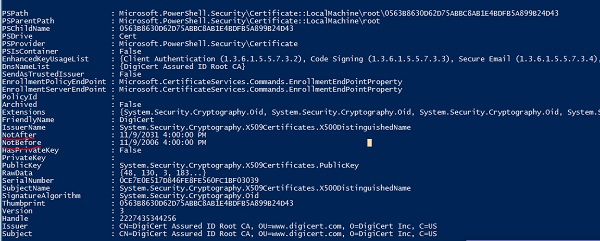
您可以看到列出了两个字段,NotAfter 和 NotBefore,分别显示到期日期和生效日期。要过滤掉它们,
示例
Get-ChildItem Cert:\LocalMachine\root\0563B8630D62D75 | Select FriendlyName, NotAfter,NotBefore
输出
FriendlyName NotAfter   NotBefore
------------ --------   ---------
DigiCert     11/9/2031  4:00:00 PM 11/9/2006 4:00:00 PM
使用 FriendlyName 属性,
Get-ChildItem Cert:\LocalMachine\root\ | where{$_.FriendlyName -eq “DigiCert”} | Select FriendlyName, NotAfter,NotBefore
要从远程计算机获取详细信息,请使用 Invoke-Command。
Invoke-Command -ComputerName Test1PC, Test2PC -ScriptBlock {
   Get-ChildItem Cert:\LocalMachine\root\ | where{$_.FriendlyName -eq “DigiCert”} | Select FriendlyName, NotAfter,NotBefore
}

