
如何使用 Tkinter 将 Python 3 应用程序编译为 .exe?
tkinterpythongui-programming更新于 2025/5/19 13:00:17
Python 以其丰富的扩展和包库而闻名。我们可以从库中导入和安装必要的包。但是,如果我们需要在 Windows 操作系统中使用可执行文件运行 Tkinter 应用程序,那么我们可以使用 Python 中的 Pyinstaller 包。它将基于 Python 的应用程序转换为本机可执行文件(或 .exe)。
按照以下步骤将基于 Tkinter 的应用程序编译为可执行文件,
使用"pip install pyinstaller"安装 Pyinstaller。
在应用程序文件所在的同一目录中打开命令或 Shell,并使用命令 pyinstaller --onefile app.py 运行该文件。它将创建必要的文件夹,例如二进制文件和其他源文件。
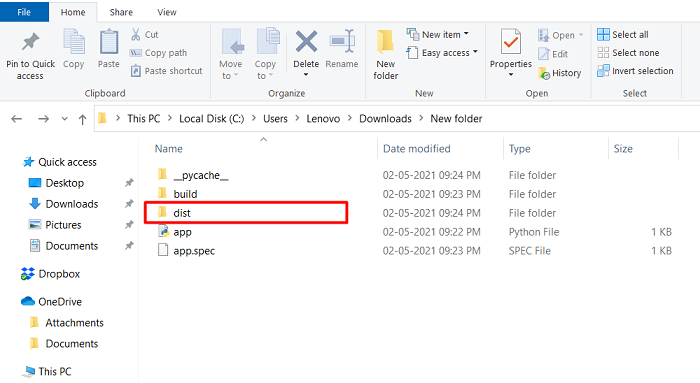
转到应用程序的可执行文件所在的 > dist 文件夹。
运行 .exe 文件。
示例
app.py
#导入所需的库
from tkinter import *
#创建 Tkinter Frame 的实例
win = Tk()
#设置几何图形
win.geometry("750x350")
def display_text():
Label(win, text= "Hey There! Welcome to TutorialsPoint", font= ('Helvetica 22 bold'), foreground="navy").pack()
#创建一个按钮
Button(win, text= "Click Me", font= ('Helvetica 13 bold'), foreground= "OrangeRed3", background= "White", command= display_text).pack(pady=50)
win.mainloop()
输出
.exe 文件将在 dist 文件夹中创建,如下所示。
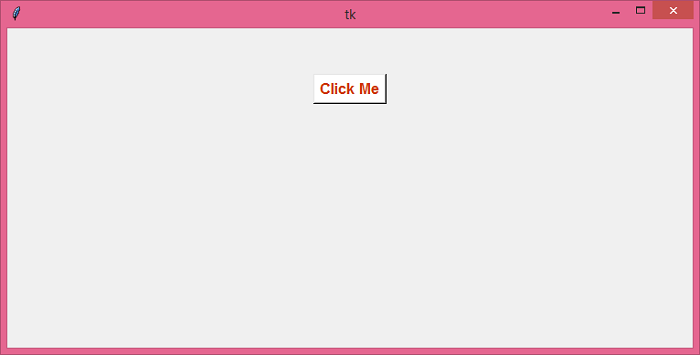
运行应用程序的可执行文件将显示一个带有按钮的窗口。
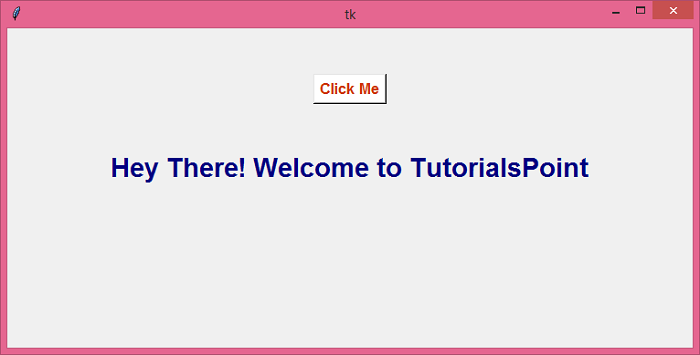
单击"单击我"按钮后,它将在同一窗口中显示一个文本标签。
相关文章
有用资源
python 参考教程 - 该教程包含有关 python 的更多信息:https://www.cainiaomax.com/python/

