
如何在 PowerShell 中将命令输出转换为哈希表格式?
powershellmicrosoft technologiessoftware & coding
要在 PowerShell 中将任何命令输出转换为哈希表,我们可以先使用 ConvertTo-JSON 命令将输出转换为 JSON 格式,然后对第一个输出应用 ConvertFrom-JSON 命令将生成一个到哈希表的输出。
示例
Get-Service
上述命令将以数组格式提供输出。
输出
Status  Name            DisplayName
------  ----            -----------
Stopped WwanSvc         WWAN AutoConfig
Stopped XblAuthManager  Xbox Live Auth Manager
Stopped XblGameSave     Xbox Live Game Save
Stopped XboxGipSvc      Xbox Accessory Management Service
Stopped XboxNetApiSvc   Xbox Live Networking Service
要将上述输出转换为哈希表,请使用以下命令:
示例
Get-Service | ConvertTo-Json | ConvertFrom-Json
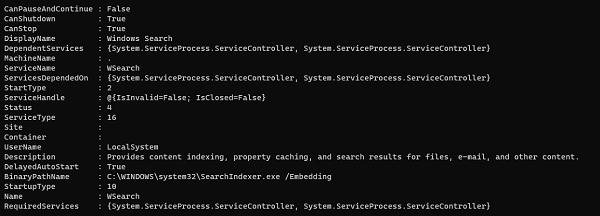
使用上述命令时,它会显示所有属性。如果只想获取部分属性,请使用 select 命令。
Get-Service | ConvertTo-Json | ConvertFrom-Json | Select Name, DisplayName, Status, Startype, DependentServices
Name : XblAuthManager
DisplayName : Xbox Live Auth Manager
Status : 1
Startype :
DependentServices : {System.ServiceProcess.ServiceController}
Name : XblGameSave
DisplayName : Xbox Live Game Save
Status : 1
Startype :
DependentServices : {}
您现在可以存储输出并像 Hashtable 一样播放它。

