如何在 Java 中创建一个 Box 以从左到右显示组件
java 8object oriented programmingprogramming更新于 2025/9/15 13:32:17
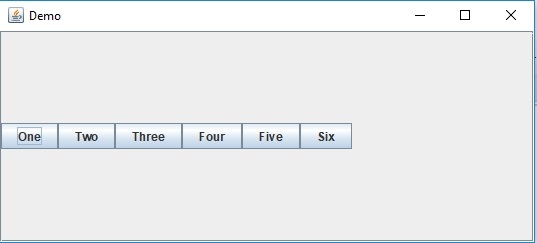
Box 是一个轻量级容器,它使用 BoxLayout 对象作为其布局管理器。要从左到右显示组件,请使用 Box createHorizontalBox() 方法。
让我们首先创建一些按钮组件 −
JButton button1 = new JButton("One");
JButton button2 = new JButton("Two");
JButton button3 = new JButton("Three");
JButton button4 = new JButton("Four");
JButton button5 = new JButton("Five");
JButton button6 = new JButton("Six");
现在,创建一个 Box 并将所有按钮从左到右对齐 −
Box box = Box.createHorizontalBox(); box.add(button1); box.add(button2); box.add(button3); box.add(button4); box.add(button5); box.add(button6);
以下是创建一个 Box 以从左到右显示组件的示例 −
示例
package my;
import java.awt.BorderLayout;
import javax.swing.Box;
import javax.swing.JButton;
import javax.swing.JFrame;
import javax.swing.JScrollPane;
public class SwingDemo {
   public static void main(String args[]) {
      JFrame frame = new JFrame("Demo");
      frame.setDefaultCloseOperation(JFrame.EXIT_ON_CLOSE);
      JButton button1 = new JButton("One");
      JButton button2 = new JButton("Two");
      JButton button3 = new JButton("Three");
      JButton button4 = new JButton("Four");
      JButton button5 = new JButton("Five");
      JButton button6 = new JButton("Six");
      Box box = Box.createHorizontalBox();
      box.add(button1);
      box.add(button2);
      box.add(button3);
      box.add(button4);
      box.add(button5);
      box.add(button6);
      JScrollPane jScrollPane = new JScrollPane();
      jScrollPane.setViewportView(box);
      frame.add(jScrollPane, BorderLayout.CENTER);
      frame.setSize(550, 250);
      frame.setVisible(true);
   }
}
这将产生以下输出 −