如何在 JavaFX 中创建按钮?
javafxobject oriented programmingprogramming更新于 2026/1/4 4:28:17
在 JavaFX 中,javafx.scene.control 包提供了各种专为 UI 应用程序设计的节点(类),这些节点可重复使用。您可以自定义这些节点并为您的 JavaFX 应用程序构建视图页面。例如:按钮、复选框、标签等。
按钮是用户界面应用程序中的控件,一般来说,单击按钮时会执行相应的操作。
您可以通过实例化此包的 javafx.scene.control.Button 类来创建按钮,并且可以使用 setText() 方法将文本设置为按钮。
示例
import javafx.application.Application;
import javafx.scene.Group;
import javafx.scene.Scene;
import javafx.scene.control.Button;
import javafx.scene.paint.Color;
import javafx.stage.Stage;
public class ButtonExample extends Application {
   @Override
   public void start(Stage stage) {
      //创建按钮
      Button button = new Button();
      //设置按钮文本
      button.setText("Sample Button");
      //设置按钮位置
      button.setTranslateX(150);
      button.setTranslateY(60);
      //设置舞台
      Group root = new Group(button);
      Scene scene = new Scene(root, 595, 150, Color.BEIGE);
      stage.setTitle("Button Example");
      stage.setScene(scene);
      stage.show();
   }
   public static void main(String args[]){
      launch(args);
   }
}
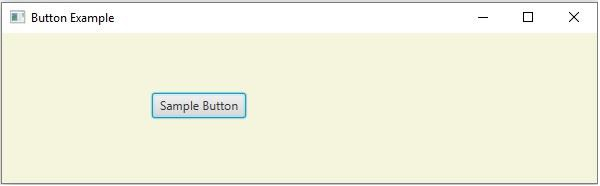
输出