如何在 ReactJS 中创建密码检查表?
如今,应用程序使用一次性密码或魔术链接进行身份验证,但我们不能忽略使用用户名和密码的身份验证。
每当我们允许用户使用用户名和密码注册时,都应该确保用户输入的密码是强密码。这样,黑客就无法破解它。
在本教程中,我们将学习如何在 ReactJS 中验证密码的安全级别。
创建自定义验证算法
我们可以创建一个自定义验证算法来检查密码的强弱。我们可以为小写字母、大写字母和数字字母创建正则表达式。
之后,我们可以使用 match() 方法将密码字符串与正则表达式匹配。如果任何密码字符串与任何正则表达式不匹配,我们就可以显示密码强度低的消息。
语法
用户可以按照以下语法,通过创建自定义算法,使用正则表达式来验证密码。
var lowerCase = /[a-z]/g;
var upperCase = /[A-Z]/g;
var numbers = /[0-9]/g;
let bool = new_pass.match(regex)
在上述语法中,我们使用了不同的正则表达式。我们对每个正则表达式都使用了 match() 方法,并将结果保存在 bool 变量中。
算法
步骤 1 – 创建一个包含小写字母、大写字母和数字字母的正则表达式。
步骤 2 – 使用 match() 方法将密码与小写字母正则表达式匹配。如果 match() 方法返回 false,则设置错误消息。
步骤 3 – 将数字和大写字母正则表达式与密码匹配,并根据返回的布尔值设置错误消息。
步骤 4 – 接下来,检查密码的长度。如果长度小于 10,也设置错误消息。
示例 1
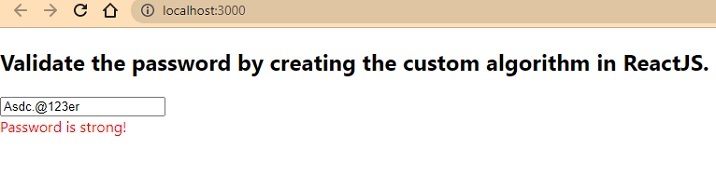
在下面的示例中,我们创建了密码输入框。每当用户更改密码值时,它都会调用 handlePassword() 函数。在 handlePassword() 函数中,我们创建了各种正则表达式,并使用 match() 方法将它们与密码字符串匹配。
在输出中,用户可以看到,如果密码不符合任何条件,则会显示相应的错误消息。
import React, { useState } from "react";
const App = () => {
   const [password, setPassword] = useState("Abc.@678");
   const [errorMessage, setErrorMessage] = useState("");
   function handlePassword(event) {
      let new_pass = event.target.value;
      setPassword(new_pass);

      // regular expressions to validate password
      var lowerCase = /[a-z]/g;
      var upperCase = /[A-Z]/g;
      var numbers = /[0-9]/g;
      if (!new_pass.match(lowerCase)) {
         setErrorMessage("Password should contains lowercase letters!");
      } else if (!new_pass.match(upperCase)) {
         setErrorMessage("Password should contain uppercase letters!");
      } else if (!new_pass.match(numbers)) {
         setErrorMessage("Password should contains numbers also!");
      } else if (new_pass.length < 10) {
         setErrorMessage("Password length should be more than 10.");
      } else {
         setErrorMessage("Password is strong!");
      }
   }
   return (
      <div>
         <h2>
            {" "}
            Validate the password by creating the custom algorithm in ReactJS.{" "}
         </h2>
         <input type = "text" value = {password} onChange = {handlePassword} />
         <div style = {{ color: "red" }}> {errorMessage} </div>
      </div>
   );
};
export default App;
输出
使用 React Password Checklist NPM 包
ReactJS 的最大优点在于它包含各种库;我们可以通过安装它直接在应用中使用。react-password-checklist 库允许我们根据各种条件检查密码强度。
例如,它可以验证密码的最小长度和最大长度、大小写、数字等。开发者需要在 PasswordChecklist 组件中传递相应的 props,该组件会相应地验证密码。
执行以下命令在我们的应用中安装 react-password-checklist。
npm i react-password-checklist
语法
用户可以按照以下语法使用 react-password-checklist NPM 包来验证密码。
<PasswordChecklist
   rules={["capital", "match", "specialChar", "minLength", "number"]}
   minLength={8}
   value={password}
   valueAgain={matchPassword}
/>
在上述语法中,我们使用了 PasswordChecklist 组件并传递了 props 来验证密码。
示例 2
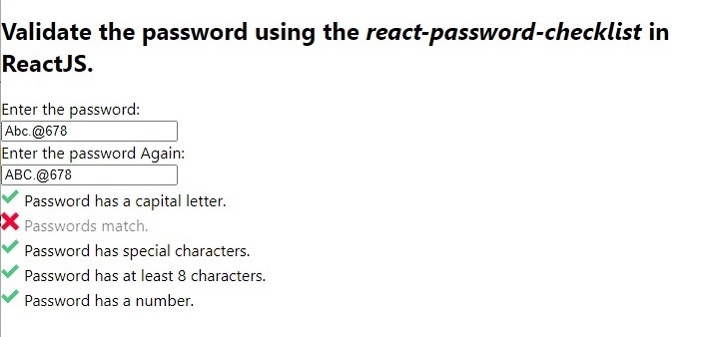
在下面的示例中,我们导入了 react-password-checklist 库并将其用作组件。我们将规则以数组格式的 props 形式传递,以验证密码。此外,我们将密码绑定到值,并将 passwordMatch 绑定到 PasswordCheckList 组件中的 valueAgain。
在输出中,用户可以在表示规则不符合密码字符串的消息前看到一个叉号。
import React, { useState } from "react";
import PasswordChecklist from "react-password-checklist";
const App = () => {
   const [password, setPassword] = useState("Abc.@678");
   const [matchPassword, setMatchPassword] = useState("ABC.@678");
   const [errorMessage, setErrorMessage] = useState("");
   function handleSetPassword(event) {
      setPassword(event.target.value);
   }
   function handleSetMatchPassword(event) {
      setMatchPassword(event.target.value);
   }
   return (
      <div>
         <h2>
            {" "}
            Validate the password using the <i> react-password-checklist </i> in ReactJS.{" "}
         </h2>
         <div> Enter the password: </div>
         <input type = "text" value = {password} onChange = {handleSetPassword} />
         <div> Enter the password Again: </div>
         <input
            type = "text"
            value = {matchPassword}
            onChange = {handleSetMatchPassword}
         />
         <PasswordChecklist
            rules = {["capital", "match", "specialChar", "minLength", "number"]}
            minLength = {8}
            value = {password}
            valueAgain = {matchPassword}
         />
      </div>
   );
};
export default App;
输出
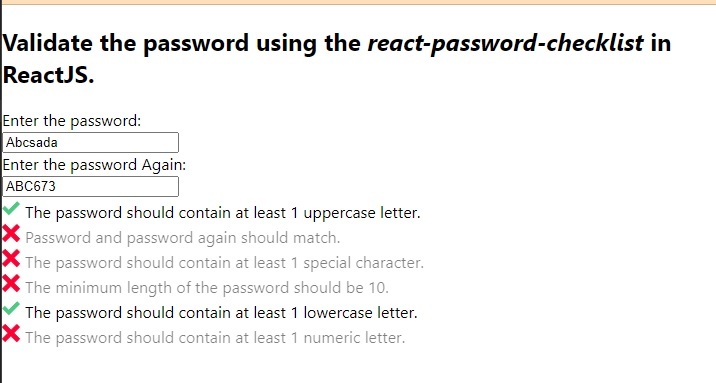
示例 3
在下面的示例中,我们为每个密码检查规则设置了自定义验证消息。用户可以看到我们如何将消息对象作为 PasswordChecklist 组件的 prop 传递。在消息对象中,我们使用规则作为键,消息作为其值。
import React, { useState } from "react";
import PasswordChecklist from "react-password-checklist";
const App = () => {
   const [password, setPassword] = useState("Abc.@678");
   const [matchPassword, setMatchPassword] = useState("ABC.@678");
   const [errorMessage, setErrorMessage] = useState("");
   function handleSetPassword(event) {
      setPassword(event.target.value);
   }
   function handleSetMatchPassword(event) {
      setMatchPassword(event.target.value);
   }
   return (
      <div>
         <h2>
            {" "}
            Validate the password using the <i> react-password-checklist </i> in ReactJS.{" "}
         </h2>
         <div> Enter the password: </div>
         <input type = "text" value = {password} onChange = {handleSetPassword} />
         <div> Enter the password Again: </div>
         <input
            type = "text"
            value = {matchPassword}
            onChange = {handleSetMatchPassword}
         />
         <PasswordChecklist
            rules = {[
               "capital",
               "match",
               "specialChar",
               "minLength",
               "lowercase",
               "number",
            ]}
            minLength = {10}
            value = {password}
            valueAgain = {matchPassword}
            messages = {{
               minLength: "The minimum length of the password should be 10.",
               specialChar:
               "The password should contain at least one special character.",
               number: "The password should contain at least one numeric letter.",
               capital: "The password should contain at least one uppercase letter.",
               match: "Password and password again should match.",
               lowercase: "The password should contain at least one lowercase letter.",
            }}
         />
      </div>
   );
};
export default App;
输出