如何使用 JavaFX 创建密码字段?
javafxobject oriented programmingprogramming更新于 2026/1/4 21:00:17
文本字段接受并显示文本。在最新版本的 JavaFX 中,它仅接受一行。在 JavaFX 中,javafx.scene.control.TextField 类表示文本字段,该类继承了 javafx.scene.control.TextInputControl(所有文本控件的基类)类。使用它,您可以接受用户的输入并将其读入您的应用程序。
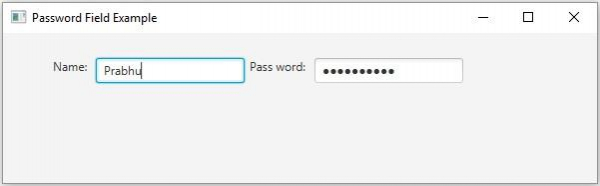
与文本字段类似,密码字段接受文本,但它不显示给定的文本,而是通过显示回显字符串来隐藏输入的字符。
在 JavaFX 中,javafx.scene.control.PasswordField 表示密码字段,它继承了 Text 类。要创建密码字段,您需要实例化此类。
示例
import javafx.application.Application;
import javafx.geometry.Insets;
import javafx.scene.Scene;
import javafx.scene.control.Label;
import javafx.scene.control.PasswordField;
import javafx.scene.control.TextField;
import javafx.scene.layout.HBox;
import javafx.scene.paint.Color;
import javafx.stage.Stage;
public class PasswordFieldExample extends Application {
   public void start(Stage stage) {
      //创建节点
      TextField textField = new TextField();
      PasswordField pwdField = new PasswordField();
      //创建标签
      Label label1 = new Label("Name: ");
      Label label2 = new Label("Pass word: ");
      //为节点添加标签
      HBox box = new HBox(5);
      box.setPadding(new Insets(25, 5 , 5, 50));
      box.getChildren().addAll(label1, textField, label2, pwdField);
      //设置舞台
      Scene scene = new Scene(box, 595, 150, Color.BEIGE);
      stage.setTitle("Password Field Example");
      stage.setScene(scene);
      stage.show();
   }
   public static void main(String args[]){
      launch(args);
   }
}
输出