
如何使用 CSS 创建产品卡片?
cssweb developmentfront end technology更新于 2025/11/27 23:40:17
使用 CSS 创建产品卡片,代码如下 −
示例
<!DOCTYPE html>
<html>
<head>
<style>
   body {
      font-family: "Segoe UI", Tahoma, Geneva, Verdana, sans-serif;
   }
   .productCard {
      box-shadow: 0 4px 8px 0 rgba(0, 0, 0, 0.2);
      max-width: 300px;
      margin: auto;
      text-align: center;
      font-family: arial;
      background-color: rgb(190, 224, 224);
   }
   .productDetails {
      color: rgb(26, 0, 51);
      font-weight: bold;
      font-size: 18px;
   }
   button {
      border: none;
      outline: 0;
      display: inline-block;
      padding: 8px;
      color: white;
      background-color: rgb(23, 31, 102);
      text-align: center;
      cursor: pointer;
      width: 100%;
      font-size: 18px;
   }
   button:hover, a:hover {
      opacity: 0.7;
   }
</style>
</head>
<body>
<h2 style="text-align:center">Product Card Example</h2>
<div class="productCard">
<img src="https://images.pexels.com/photos/1152077/pexels-photo-1152077.jpeg?auto=compress&cs=tinysrgb&dpr=2&h=650&w=940"
style="width:100%"/>
<h1>Leather Bag</h1>
<p class="productDetails">Exotic Quality</p>
<p>Price 50$</p>
<p><button>Buy Now</button></p>
</div>
</body>
</html>
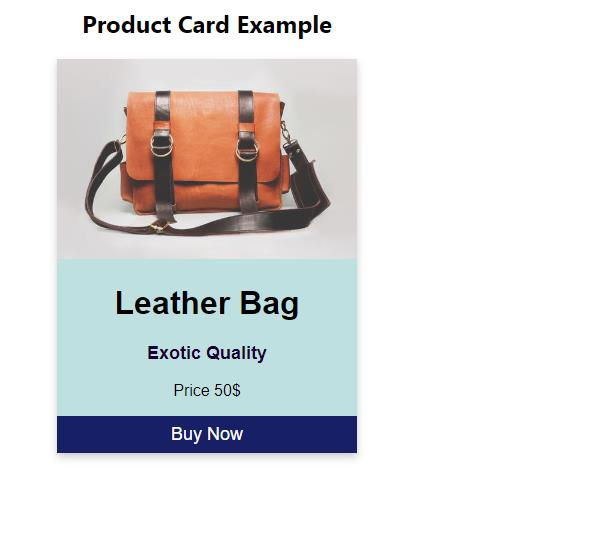
输出
上述代码将产生以下输出 −
相关文章
有用资源
css 参考教程 - 该教程包含有关 css 的更多信息:https://www.cainiaomax.com/css/

