
如何使用 JavaFX 创建矩形?
javaobject oriented programmingprogramming更新于 2025/10/12 4:28:17
矩形是一个封闭的多边形,有四条边,任意两条边之间的角度为直角,对边共点。它由其高度和宽度定义,分别是垂直边和水平边的长度。
在 JavaFX 中,矩形由 javafx.scene.shape.Rectangle 类表示。此类包含四个属性,它们是 −
height − 此属性表示圆心的 x 坐标,您可以使用 setHeight() 方法将值设置为此属性。
width −此属性表示圆心的 y 坐标,您可以使用 setWidth() 方法设置此属性的值。
x − 圆的半径(以像素为单位),您可以使用 setRadius() 方法设置此属性的值。
y −圆的半径(以像素为单位),您可以使用 setRadius() 方法将值设置为此属性
要创建 Rectangle,您需要 −
实例化 Rectangle 类。
使用 setter 方法设置所需属性,或将它们作为参数传递给构造函数。
将创建的节点(形状)添加到 Group 对象。
示例
import javafx.application.Application;
import javafx.scene.Group;
import javafx.scene.Scene;
import javafx.scene.paint.Color;
import javafx.stage.Stage;
import javafx.scene.shape.Rectangle;
public class DrawinRectangle extends Application {
   public void start(Stage stage) {
      //绘制矩形
      Rectangle shape = new Rectangle();
      //设置矩形的属性
      shape.setX(150.0f);
      shape.setY(75.0f);
      shape.setWidth(300.0f);
      shape.setHeight(150.0f);
      //设置其他属性
      shape.setFill(Color.DARKCYAN);
      shape.setStrokeWidth(8.0);
      shape.setStroke(Color.DARKSLATEGREY);
      //设置场景
      Group root = new Group(shape);
      Scene scene = new Scene(root, 595, 300, Color.BEIGE);
      stage.setTitle("Drawing Rectangle");
      stage.setScene(scene);
      stage.show();
   }
   public static void main(String args[]){
      launch(args);
   }
}
输出
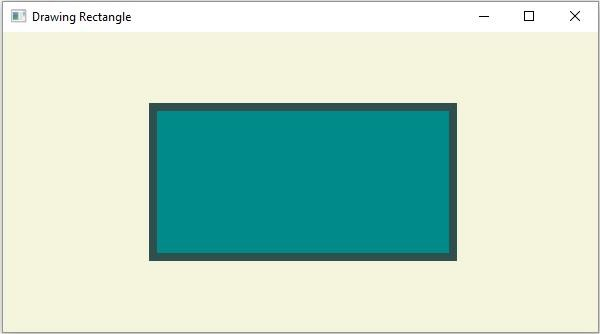
圆角矩形
除了上述属性之外,Rectangle 类还提供了另外两个属性,即 −
arcWidth − 此属性表示 4 个角的圆弧直径。您可以使用 setArcWidth() 方法设置其值。
arcHeight − 此属性表示 4 个角的圆弧高度。您可以使用 setArcHeight() 方法设置其值。
通过设置这些值,您可以绘制具有圆角/弧形边缘的矩形 −
示例
import javafx.application.Application;
import javafx.scene.Group;
import javafx.scene.Scene;
import javafx.scene.paint.Color;
import javafx.stage.Stage;
import javafx.scene.shape.Rectangle;
public class DrawingRoundedRectangle extends Application {
   public void start(Stage stage) {
      //绘制矩形
      Rectangle shape = new Rectangle();
      //设置矩形的属性
      shape.setX(150.0f);
      shape.setY(75.0f);
      shape.setWidth(300.0f);
      shape.setHeight(150.0f);
      shape.setArcHeight(30.0);
      shape.setArcWidth(30.0);
      //设置其他属性
      shape.setFill(Color.DARKCYAN);
      shape.setStrokeWidth(8.0);
      shape.setStroke(Color.DARKSLATEGREY);
      //设置场景
      Group root = new Group(shape);
      Scene scene = new Scene(root, 595, 300, Color.BEIGE);
      stage.setTitle("Drawing Rectangle");
      stage.setScene(scene);
      stage.show();
   }
   public static void main(String args[]){
      launch(args);
   }
}
输出
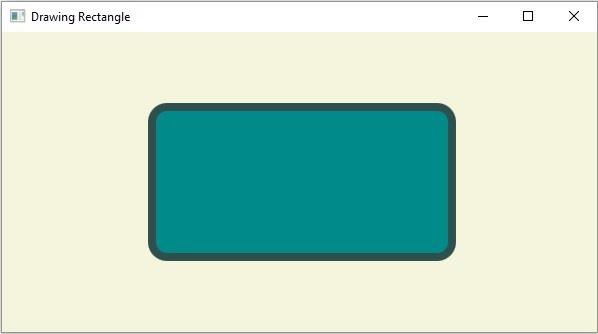
相关文章
有用资源
java 参考教程 - 该教程包含有关 java 的更多信息:https://www.cainiaomax.com/java/

