如何在 JavaFX 中创建文本区域?
javafxobject oriented programmingprogramming更新于 2026/1/7 18:52:17
文本区域是一个多行编辑器,您可以在其中输入文本。与以前的版本不同,在最新版本的 JavaFX 中,TextArea 不允许在其中输入单行。您可以通过实例化 javafx.scene.control.TextArea 类 来创建文本区域。
示例
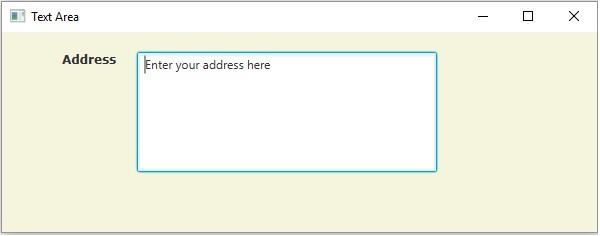
以下示例演示了如何创建 TextArea。
import javafx.application.Application;
import javafx.geometry.Insets;
import javafx.scene.Group;
import javafx.scene.Scene;
import javafx.scene.control.Label;
import javafx.scene.control.TextArea;
import javafx.scene.layout.HBox;
import javafx.scene.paint.Color;
import javafx.scene.text.Font;
import javafx.scene.text.FontPosture;
import javafx.scene.text.FontWeight;
import javafx.stage.Stage;
public class TextAreaExample extends Application {
   public void start(Stage stage) {
      //设置标签
      Label label = new Label("Address");
      Font font = Font.font("verdana", FontWeight.BOLD, FontPosture.REGULAR, 12);
      label.setFont(font);
      //创建分页
      TextArea area = new TextArea();
      //设置页数
      area.setText("Enter your address here");
      area.setPrefColumnCount(15);
      area.setPrefHeight(120);
      area.setPrefWidth(300);
      //创建一个 hbox 来容纳分页
      HBox hbox = new HBox();
      hbox.setSpacing(20);
      hbox.setPadding(new Insets(20, 50, 50, 60));
      hbox.getChildren().addAll(label, area);
      //设置舞台
      Group root = new Group(hbox);
      Scene scene = new Scene(root, 595, 200, Color.BEIGE);
      stage.setTitle("Text Area");
      stage.setScene(scene);
      stage.show();
   }
   public static void main(String args[]){
      launch(args);
   }
}
输出