如何使用 JavaFX 创建 HBox?
javafxobject oriented programmingprogramming更新于 2026/1/8 11:56:17
创建应用程序所需的所有节点后,您可以使用布局来排列它们。布局是计算给定空间中对象位置的过程。JavaFX 在 javafx.scene.layout 包中提供了各种布局。
hbox
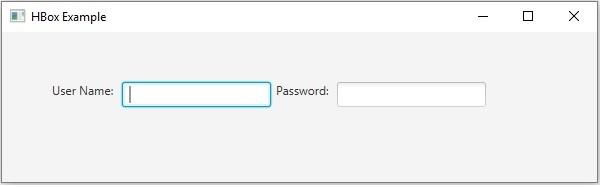
在此布局中,节点排列在单个水平行中。您可以通过实例化 javafx.scene.layout.HBox 类在应用程序中创建 hbox。您可以使用 setPadding() 方法设置 hbox 周围的填充。
要将节点添加到此窗格,您可以将它们作为构造函数的参数传递,也可以将它们添加到窗格的可观察列表中 −
getChildren().addAll();
示例
import javafx.application.Application;
import javafx.geometry.Insets;
import javafx.scene.Scene;
import javafx.scene.control.Label;
import javafx.scene.control.PasswordField;
import javafx.scene.control.TextField;
import javafx.scene.layout.HBox;
import javafx.scene.paint.Color;
import javafx.stage.Stage;
public class HBoxExample extends Application {
   public void start(Stage stage) {
      //创建标签
      Label label1 = new Label("用户名:");
      Label label2 = new Label("密码:");
      //创建文本和密码字段
      TextField textField = new TextField();
      PasswordField pwdField = new PasswordField();
      //为节点添加标签
      HBox box = new HBox(5);
      box.setPadding(new Insets(50, 5 , 5, 50));
      box.getChildren().addAll(label1, textField, label2, pwdField);
      //设置舞台
      Scene scene = new Scene(box, 595, 150, Color.BEIGE);
      stage.setTitle("HBox Example");
      stage.setScene(scene);
      stage.show();
   }
   public static void main(String args[]){
      launch(args);
   }
}
输出