
如何使用 CSS 创建底部带边框(下划线)的导航链接?
cssweb developmentfront end technology更新于 2025/9/26 21:32:17
以下是使用 CSS 创建底部带边框(下划线)的导航链接的代码 −
示例
<!DOCTYPE html>
<html lang="en">
<head>
<meta charset="UTF-8">
<meta name="viewport" content="width=device-width, initial-scale=1.0">
<title>Document</title>
<style>
body{
   margin:0px;
   margin-top:60px;
   padding: 0px;
}
nav{
   position: fixed;
   top:0;
   width: 100%;
   background-color: rgb(251, 255, 196);
   overflow: auto;
   height: auto;
}
.links {
   display: inline-block;
   text-align: center;
   padding: 14px;
   color: rgb(0, 0, 0);
   text-decoration: none;
   font-size: 17px;
   font-weight: bolder;
}
.links:hover {
   border-bottom: 2px solid purple;
}
.selected{
   border-bottom: 2px solid purple;
}
</style>
</head>
<body>
<nav>
<a class="links selected" href="#"> Home</a>
<a class="links" href="#"> Login</a>
<a class="links" href="#">Register</a>
<a class="links" href="#">Contact Us</a>
<a class="links" href="#">More Info</a>
</nav>
<h1>Hover on the above links</h1>
</body>
</html>
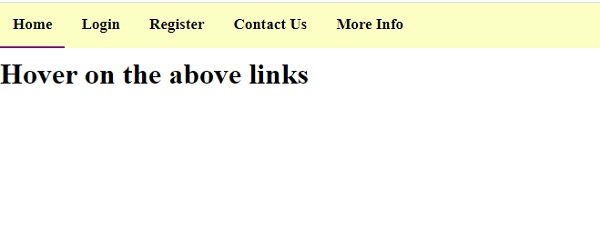
输出
上述代码将产生以下输出 −
相关文章
有用资源
css 参考教程 - 该教程包含有关 css 的更多信息:https://www.cainiaomax.com/css/

