
如何使用 CSS 创建等高列?
cssweb developmentfront end technology更新于 2025/11/28 8:12:17
要使用 CSS 创建等高列,代码如下: −
示例
<!DOCTYPE html>
<html>
<head>
<meta name="viewport" content="width=device-width, initial-scale=1" />
<style>
   body {
      font-family: "Segoe UI", Tahoma, Geneva, Verdana, sans-serif;
   }
   .container {
      display: table;
      width: 100%;
   }
   .column {
      display: table-cell;
      padding: 16px;
      background-color: greenyellow;
   }
   .column:nth-of-type(2n-1) {
      color: red;
      background-color: yellow;
   }
</style>
</head>
<body>
<h1>Equal Height Columns Example</h1>
<div class="container">
<div class="column">
<h2>Column 1</h2>
<h2>Column 1</h2>
<h2>Column 1</h2>
</div>
<div class="column">
<h2>Column 2</h2>
<h2>Column 2</h2>
<h2>Column 2</h2>
</div>
<div class="column">
<h2>Column 3</h2>
<h2>Column 3</h2>
<h2>Column 3</h2>
</div>
</div>
</body>
</html>
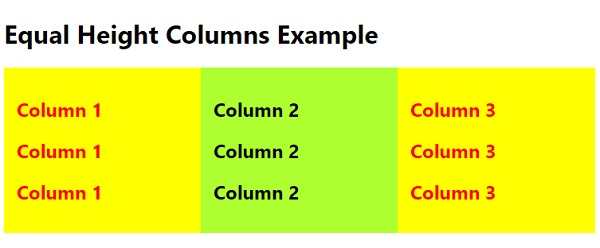
输出
上述代码将产生以下输出 −
相关文章
有用资源
css 参考教程 - 该教程包含有关 css 的更多信息:https://www.cainiaomax.com/css/

