
如何使用 CSS 创建图标栏?
cssweb developmentfront end technology更新于 2025/9/26 13:32:17
使用 CSS 创建图标栏,代码如下 −
示例
<!DOCTYPE html>
<html>
<meta name="viewport" content="width=device-width, initial-scale=1">
<link rel="stylesheet" href="https://cdnjs.cloudflare.com/ajax/libs/font-awesome/4.7.0/css/font-awesome.min.css">
<style>
.icon-bar {
   width: 100%;
   background-color: black;
   overflow: auto;
}
.icon-bar a {
   float: left;
   width: 30%;
   text-align: center;
   color: white;
   font-size: 30px;
}
.active {
   background-color: blue;
}
</style>
<body>
   <div class="icon-bar">
      <a href="#"><i class="fa fa-home"></i></a>
      <a href="#"><i class="fa fa-search"></i></a>
      <a class="active" href="#"><i class="fa fa-bars"></i></a>
   </div>
</body>
</html>
输出
这将产生以下输出 −
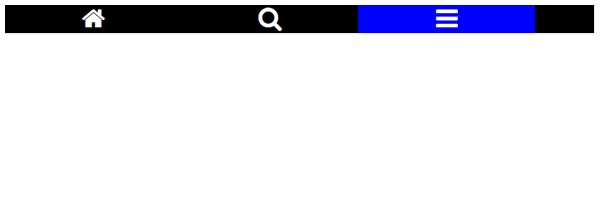
示例
现在让我们看另一个示例,其中我们将创建垂直图标栏 −
<!DOCTYPE html>
<html>
<meta name="viewport" content="width=device-width, initial-scale=1">
<link rel="stylesheet" href="https://cdnjs.cloudflare.com/ajax/libs/font-awesome/4.7.0/css/font-awesome.min.css">
<style>
.icon-bar {
   width: 50px;
   background-color: black;
}
.icon-bar a {
   display: block;
   text-align: center;
   color: white;
   font-size: 30px;
}
.active {
   background-color: blue;
}
</style>
<body>
   <div class="icon-bar">
      <a class="active" href="#"><i class="fa fa-home"></i></a>
      <a href="#"><i class="fa fa-search"></i></a>
      <a href="#"><i class="fa fa-bars"></i></a>
   </div>
</body>
</html>
输出
这将产生以下输出 −

相关文章
有用资源
css 参考教程 - 该教程包含有关 css 的更多信息:https://www.cainiaomax.com/css/

