
如何在不使用 Google API 的情况下使用 Kotlin 在 Android 中开发语音识别器?
kotlin apps/applicationsmobile development更新于 2026/2/10 23:52:17
本示例演示了如何在不使用 Google API 的情况下使用 Kotlin 在 Android 中开发语音识别器。
步骤 1 − 在 Android Studio 中创建一个新项目,前往"文件">"新建项目",并填写所有必填信息以创建新项目。
步骤 2 − 将以下代码添加到 res/layout/activity_main.xml。
示例
<?xml version="1.0" encoding="utf-8"?>
<RelativeLayout xmlns:android="http://schemas.android.com/apk/res/android"
   android:layout_width="match_parent"
   android:layout_height="match_parent"
   android:orientation="vertical">
   <ImageView
      android:id="@+id/imageView"
      android:layout_width="200dp"
      android:layout_height="200dp"
      android:layout_centerInParent="true"
      android:src="@drawable/ic_mic" />
   <ProgressBar
      android:id="@+id/progressBar"
      style="?android:attr/progressBarStyleHorizontal"
      android:layout_width="match_parent"
      android:layout_height="wrap_content"
      android:layout_below="@+id/toggleButton"
      android:layout_alignParentStart="true"
      android:layout_marginTop="28dp"
      android:paddingLeft="10dp"
      android:paddingRight="10dp" />
   <TextView
      android:id="@+id/textView"
      android:layout_width="wrap_content"
      android:layout_height="wrap_content"
      android:layout_below="@+id/progressBar"
      android:layout_centerHorizontal="true"
      android:layout_marginTop="47dp" />
   <ToggleButton
      android:id="@+id/toggleButton"
      android:layout_width="wrap_content"
      android:layout_height="wrap_content"
      android:layout_alignParentTop="true"
      android:layout_centerHorizontal="true"
      android:layout_marginTop="26dp"
      android:text="ToggleButton" />
</RelativeLayout>
步骤 3 − 将以下代码添加到 src/MainActivity.kt
示例
import android.Manifest
import android.content.Intent
import android.content.pm.PackageManager
import android.os.Bundle
import android.speech.RecognitionListener
import android.speech.RecognizerIntent
import android.speech.SpeechRecognizer
import android.util.Log
import android.view.View
import android.widget.ProgressBar
import android.widget.TextView
import android.widget.Toast
import android.widget.ToggleButton
import androidx.appcompat.app.AppCompatActivity
import androidx.core.app.ActivityCompat
class MainActivity : AppCompatActivity(), RecognitionListener {
   private val permission = 100
   private lateinit var returnedText: TextView
   private lateinit var toggleButton: ToggleButton
   private lateinit var progressBar: ProgressBar
   private lateinit var speech: SpeechRecognizer
   private lateinit var recognizerIntent: Intent
   private var logTag = "VoiceRecognitionActivity"
   override fun onCreate(savedInstanceState: Bundle?) {
      super.onCreate(savedInstanceState)
      setContentView(R.layout.activity_main)
      title = "KotlinApp"
      returnedText = findViewById(R.id.textView)
      progressBar = findViewById(R.id.progressBar)
      toggleButton = findViewById(R.id.toggleButton)
      progressBar.visibility = View.VISIBLE
      speech = SpeechRecognizer.createSpeechRecognizer(this)
      Log.i(logTag, "isRecognitionAvailable: " + SpeechRecognizer.isRecognitionAvailable(this))
      speech.setRecognitionListener(this)
      recognizerIntent = Intent(RecognizerIntent.ACTION_RECOGNIZE_SPEECH)
      recognizerIntent.putExtra(RecognizerIntent.EXTRA_LANGUAGE_PREFERENCE, "US-en")
      recognizerIntent.putExtra(RecognizerIntent.EXTRA_LANGUAGE_MODEL,
      RecognizerIntent.LANGUAGE_MODEL_FREE_FORM)
      recognizerIntent.putExtra(RecognizerIntent.EXTRA_MAX_RESULTS, 3)
      toggleButton.setOnCheckedChangeListener { _, isChecked ->
         if (isChecked) {
            progressBar.visibility = View.VISIBLE
            progressBar.isIndeterminate = true
            ActivityCompat.requestPermissions(this@MainActivity,
            arrayOf(Manifest.permission.RECORD_AUDIO),
            permission)
         } else {
            progressBar.isIndeterminate = false
            progressBar.visibility = View.VISIBLE
            speech.stopListening()
         }
      }
   }
   override fun onRequestPermissionsResult(requestCode: Int, permissions: Array<String?>,
   grantResults: IntArray) {
      super.onRequestPermissionsResult(requestCode, permissions, grantResults)
      when (requestCode) {
         permission -> if (grantResults.isNotEmpty() && grantResults[0] == PackageManager
         .PERMISSION_GRANTED) {
            speech.startListening(recognizerIntent)
         } else {
            Toast.makeText(this@MainActivity, "Permission Denied!",
            Toast.LENGTH_SHORT).show()
         }
      }
   }
   override fun onStop() {
      super.onStop()
      speech.destroy()
      Log.i(logTag, "destroy")
   }
   override fun onReadyForSpeech(params: Bundle?) {
      TODO("Not yet implemented")
   }
   override fun onRmsChanged(rmsdB: Float) {
      progressBar.progress = rmsdB.toInt()
   }
   override fun onBufferReceived(buffer: ByteArray?) {
      TODO("Not yet implemented")
   }
   override fun onPartialResults(partialResults: Bundle?) {
      TODO("Not yet implemented")
   }
   override fun onEvent(eventType: Int, params: Bundle?) {
      TODO("Not yet implemented")
   }
   override fun onBeginningOfSpeech() {
      Log.i(logTag, "onBeginningOfSpeech")
      progressBar.isIndeterminate = false
      progressBar.max = 10
   }
   override fun onEndOfSpeech() {
      progressBar.isIndeterminate = true
      toggleButton.isChecked = false
   }
   override fun onError(error: Int) {
      val errorMessage: String = getErrorText(error)
      Log.d(logTag, "FAILED $errorMessage")
      returnedText.text = errorMessage
      toggleButton.isChecked = false
   }
   private fun getErrorText(error: Int): String {
      var message = ""
      message = when (error) {
         SpeechRecognizer.ERROR_AUDIO -> "Audio recording error"
         SpeechRecognizer.ERROR_CLIENT -> "Client side error"
         SpeechRecognizer.ERROR_INSUFFICIENT_PERMISSIONS -> "Insufficient permissions"
         SpeechRecognizer.ERROR_NETWORK -> "Network error"
         SpeechRecognizer.ERROR_NETWORK_TIMEOUT -> "Network timeout"
         SpeechRecognizer.ERROR_NO_MATCH -> "No match"
         SpeechRecognizer.ERROR_RECOGNIZER_BUSY -> "RecognitionService busy"
         SpeechRecognizer.ERROR_SERVER -> "error from server"
         SpeechRecognizer.ERROR_SPEECH_TIMEOUT -> "No speech input"
         else -> "Didn't understand, please try again."
      }
      return message
   }
   override fun onResults(results: Bundle?) {
      Log.i(logTag, "onResults")
      val matches = results!!.getStringArrayList(SpeechRecognizer.RESULTS_RECOGNITION)
      var text = ""
      for (result in matches) text = """
      $result
      """.trimIndent()
      returnedText.text = text
   }
}
步骤 4 − 将以下代码添加到 androidManifest.xml
示例
<?xml version="1.0" encoding="utf-8"?>
<manifest xmlns:android="http://schemas.android.com/apk/res/android" package="app.com.myapplication">
   <uses-permission android:name="android.permission.RECORD_AUDIO" />
   <uses-permission android:name="android.permission.INTERNET" />
   <application
      android:allowBackup="true"
      android:icon="@mipmap/ic_launcher"
      android:label="@string/app_name"
      android:roundIcon="@mipmap/ic_launcher_round"
      android:supportsRtl="true"
      android:theme="@style/AppTheme">
      <activity android:name=".MainActivity">
         <intent-filter>
            <action android:name="android.intent.action.MAIN" />
            <category android:name="android.intent.category.LAUNCHER" />
         </intent-filter>
      </activity>
   </application>
</manifest>
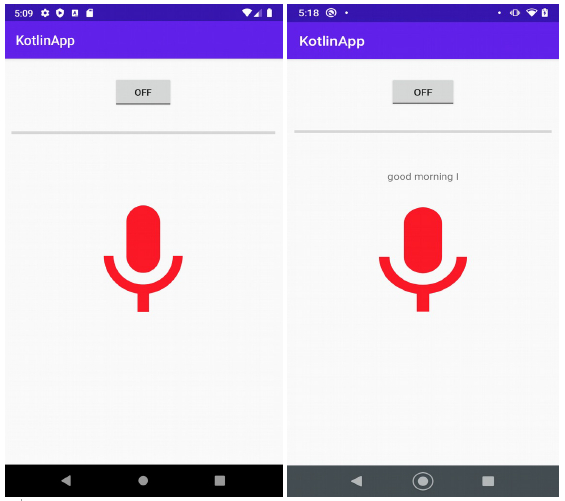
让我们尝试运行您的应用程序。假设您已将实际的 Android 移动设备连接到电脑。要从 Android Studio 运行该应用程序,请打开项目的某个活动文件,然后点击工具栏上的"运行"图标 。选择您的移动设备作为选项,然后勾选将显示默认屏幕的移动设备。
相关文章
打印
下一节:如何在 Android Kotlin 中使用 Intent 将 ArrayList 传递给另一个 Activity? ❯❮ 上一节:如何使用 Kotlin 获取 Android 中 RadioGroup 的选中索引?

