
如何在 C# ASP.NET WebAPI 中使用自定义媒体类型进行版本控制?
csharpserver side programmingprogramming更新于 2025/4/17 20:07:17
媒体类型允许 API 通知客户端如何解释有效负载中的数据。在 HTTP 协议中,媒体类型使用 text/html、application/json 和 application/xml 等标识符指定,它们分别对应于最常见的 Web 格式 HTML、JSON 和 XML。还有其他更多 API 特定的媒体类型,例如 application/vnd.api+json。
以下是需要以媒体类型发送的版本。
application/vnd.demo.students.v1+json StudentsV1Controller
application/vnd.demo.students.v2+json StudentsV2Controller
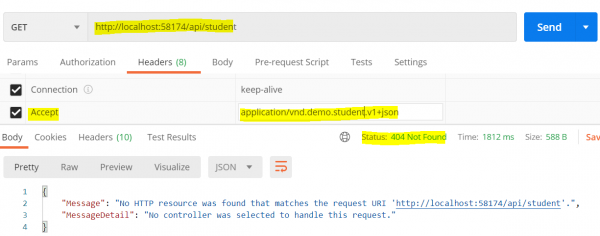
添加我们自己的 CustomControllerSelector 将修复上述错误。
CustomControllerSelector −
示例
using System.Linq;
using System.Net.Http;
using System.Text.RegularExpressions;
using System.Web.Http;
using System.Web.Http.Controllers;
using System.Web.Http.Dispatcher;
namespace WebAPI.Custom{
   public class CustomControllerSelector : DefaultHttpControllerSelector{
      private HttpConfiguration _config;
      public CustomControllerSelector(HttpConfiguration config) : base(config){
         _config = config;
      }
      public override HttpControllerDescriptor SelectController(HttpRequestMessage
      request){
         var controllers = GetControllerMapping();
         var routeData = request.GetRouteData();
         var controllerName = routeData.Values["controller"].ToString();
         string versionNumber = "";
         string regex = @"application\/vnd\.demo\.([a-z]+)\.v(?<version>[0-9]+)\+([a-z]+)";
         var acceptHeader = request.Headers.Accept
            .Where(a => Regex.IsMatch(a.MediaType, regex,
            RegexOptions.IgnoreCase));
         if (acceptHeader.Any()){
            var match = Regex.Match(acceptHeader.First().MediaType,
            regex, RegexOptions.IgnoreCase);
            versionNumber = match.Groups["version"].Value;
         }
         HttpControllerDescriptor controllerDescriptor;
         if (versionNumber == "1"){
            controllerName = string.Concat(controllerName, "V1");
         }
         else if (versionNumber == "2"){
            controllerName = string.Concat(controllerName, "V2");
         }
         if (controllers.TryGetValue(controllerName, out controllerDescriptor)){
            return controllerDescriptor;
         }
         return null;
      }
   }
}
WebApi.Config.cs −
示例
public static class WebApiConfig{
   public static void Register(HttpConfiguration config){
      config.Services.Replace(typeof(IHttpControllerSelector), new CustomControllerSelector(config));
      config.MapHttpAttributeRoutes();
      config.Routes.MapHttpRoute(
         name: "DefaultApi",
         routeTemplate: "api/{controller}/{id}",
         defaults: new { id = RouteParameter.Optional }
      );
   }
}
StudentV1Controller −
示例
using DemoWebApplication.Models;
using System.Collections.Generic;
using System.Linq;
using System.Web.Http;
namespace DemoWebApplication.Controllers{
   public class StudentV1Controller : ApiController{
      List<StudentV1> students = new List<StudentV1>{
         new StudentV1{
            Id = 1,
            Name = "Mark"
         },
         new StudentV1{
            Id = 2,
            Name = "John"
         }
      };
      public IEnumerable<StudentV1> Get(){
         return students;
      }
      public StudentV1 Get(int id){
         var studentForId = students.FirstOrDefault(x => x.Id == id);
         return studentForId;
      }
   }
}
StudentV2Controller −
示例
using DemoWebApplication.Models;
using System.Collections.Generic;
using System.Linq;
using System.Web.Http;
namespace DemoWebApplication.Controllers{
   public class StudentV2Controller : ApiController{
      List<StudentV2> students = new List<StudentV2>{
         new StudentV2{
            Id = 1,
            FirstName = "Roger",
            LastName = "Federer"
         },
         new StudentV2{
            Id = 2,
            FirstName = "Tom",
            LastName = "Bruce"
         }
      };
      public IEnumerable<StudentV2> Get(){
         return students;
      }
      public StudentV2 Get(int id){
         var studentForId = students.FirstOrDefault(x => x.Id == id);
         return studentForId;
      }
   }
}
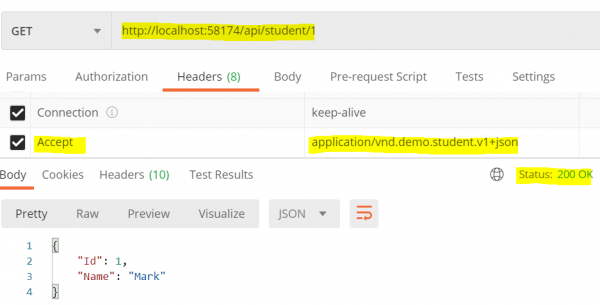
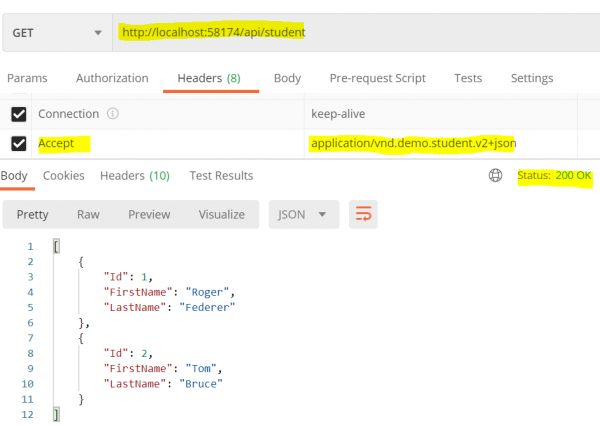
以下输出显示了我们从 StudentV1 和 StudentV2 控制器中获得的结果,这些控制器使用自定义媒体类型的版本控制。
因此,现在如果我们想使用自定义媒体类型以 xml 格式获得相同的输出,请在 webapiconfig.cs 中添加以下自定义媒体类型
示例
public static void Register(HttpConfiguration config){
   config.MapHttpAttributeRoutes();
   config.Services.Replace(typeof(IHttpControllerSelector), new
   CustomControllerSelector(config));
   config.Formatters.XmlFormatter.SupportedMediaTypes
      .Add(new MediaTypeHeaderValue("application/vnd.demo.student.v1+xml"));
   config.Formatters.XmlFormatter.SupportedMediaTypes
      .Add(new MediaTypeHeaderValue("application/vnd.demo.student.v2+xml"));
   config.Routes.MapHttpRoute(
      name: "DefaultApi",
      routeTemplate: "api/{controller}/{id}",
      defaults: new { id = RouteParameter.Optional }
   );
}
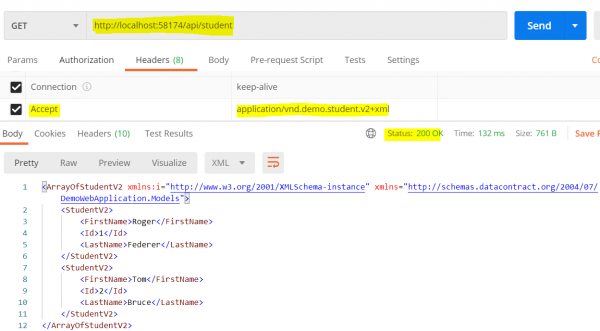
在上面的例子中,我们可以看到输出是自定义媒体类型中指定的 XML 格式。

