
如何在 Java 中按文件扩展名过滤文件并显示文件名?
java 8object oriented programmingprogramming更新于 2025/9/20 2:52:17
java.io 包中的 File 类表示系统中的文件或目录(路径名)。此类提供各种方法来对文件/目录执行各种操作。
要获取目录中所有现有文件的列表,此类提供五种不同的方法来获取特定文件夹中所有文件的详细信息 −
- String[] list()
- File[] listFiles()
- String[] list(FilenameFilter filter)
- File[] listFiles(FilenameFilter filter)
- File[] listFiles(FileFilter filter)
其中,String[] list(FilenameFilter filter) 方法返回一个字符串数组,其中包含当前(File)对象所表示的路径中的所有文件和目录的名称。但重新调整后的数组包含根据指定过滤器过滤的文件名。
FilenameFilter 是 Java 中具有单一方法的接口。
accept(File dir, String name)
要根据扩展名获取文件名,请按此方式实现此接口并将其对象传递给文件类的上述指定的 list() 方法。
示例
假设我们在目录 D 中有一个名为 ExampleDirectory 的文件夹,其中包含 7 个文件和 2 个目录,如下所示:
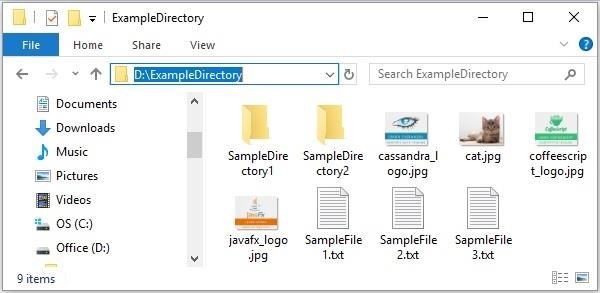
以下 Java 程序分别打印路径 D:\ExampleDirectory 中的文本文件和 jpeg 文件的名称。
import java.io.File;
import java.io.FilenameFilter;
import java.io.IOException;
public class ListOfFiles {
   public static void main(String args[]) throws IOException {
      //为目录创建 File 对象
      File directoryPath = new File("D:\ExampleDirectory");
      FilenameFilter textFilefilter = new FilenameFilter(){
         public boolean accept(File dir, String name) {
            String lowercaseName = name.toLowerCase();
            if (lowercaseName.endsWith(".txt")) {
               return true;
            } else {
               return false;
            }
         }
      };
      FilenameFilter jpgFilefilter = new FilenameFilter(){
         public boolean accept(File dir, String name) {
            String lowercaseName = name.toLowerCase();
            if (lowercaseName.endsWith(".jpg")) {
               return true;
            } else {
               return false;
            }
         }
      };
      //所有文本文件的列表
      String textFilesList[] = directoryPath.list(textFilefilter);
      System.out.println("List of the text files in the specified directory:");
      for(String fileName : textFilesList) {
         System.out.println(fileName);
      }
      String imageFilesList[] = directoryPath.list(jpgFilefilter);
      System.out.println("List of the jpeg files in the specified directory:");
      for(String fileName : imageFilesList) {
         System.out.println(fileName);
      }
   }
}
输出
List of the text files in the specified directory:
SampleFile1.txt
SampleFile2.txt
SapmleFile3.txt
List of the jpeg files in the specified directory:
cassandra_logo.jpg
cat.jpg
coffeescript_logo.jpg
javafx_logo.jpg

