
如何使用 PowerShell 获取 Windows 操作系统中的空文件?
powershellmicrosoft technologiessoftware & coding
要使用 PowerShell 获取 Windows 操作系统中的空文件列表,有两种方法:
a) 使用 Length 参数。我们将计算文件的长度。如果长度为 0,则文件为空,如下所示。
Get-ChildItem C:\Temp\ -Recurse | where{$_.Length -eq 0} |
Select @{N='EmptyFiles';E={$_.FullName}}
输出:
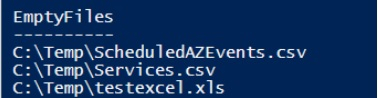
b) 另一种方法比较长,我们不想赘述。我们需要检查每个文件的内容,如果为空,则声明该文件为空文件。
Get-ChildItem C:\Temp -Recurse -File | foreach{
   if((Get-Content $_.FullName) -eq $null){
      $_.FullName
   }
此方法速度较慢,因为它会扫描每个文件的全部内容。最好使用第一种方法。

