
如何使用 PowerShell 从资源组中获取 Azure 资源?
powershellmicrosoft technologiessoftware & coding
要使用 PowerShell 从资源组中获取可用资源,我们需要使用 Get-AZResource 命令。假设我们的资源组名称为 AnsibleTestRG,并且我们需要从该资源组中检索资源,那么我们将使用以下命令。
示例
Get-AzResource -ResourceGroupName AnsibleTestRG
要过滤输出,
输出
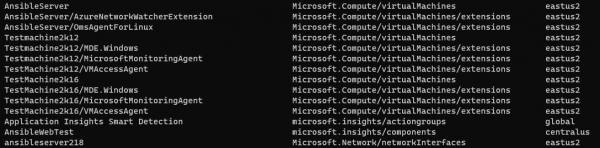
Get-AzResource -ResourceGroupName AnsibleTestRG | Select Name, ResourceType, Location
输出
如果特定订阅中有多个资源组,我们可以使用以下命令将资源组中的资源导出到 CSV 文件。
示例
$ErrorActionPreference = "Stop"
try {
    Connect-AZAccount
    Set-AzContext -SubscriptionName 'Your Subscription Name'
    $rgs = Get-AzResourceGroup

    foreach ($rg in $rgs.ResourceGroupName) {
        Write-Output "Checking Resource Group: $rg"
        Get-AzResource -ResourceGroupName $rg | Select Name, ResourceGroupName, Type, Location | Export-Csv .\AzureResources.csv -Append -Force -NoTypeInformation
    }
}
catch {
    Write-Host "$($_.Exception.Message)" -BackgroundColor DarkRed
}

