
如何使用 PowerShell 获取 IIS 应用程序池回收设置?
powershellmicrosoft technologiessoftware & coding
要使用 GUI 获取 IIS 应用程序池回收设置,您需要检查应用程序池高级设置。
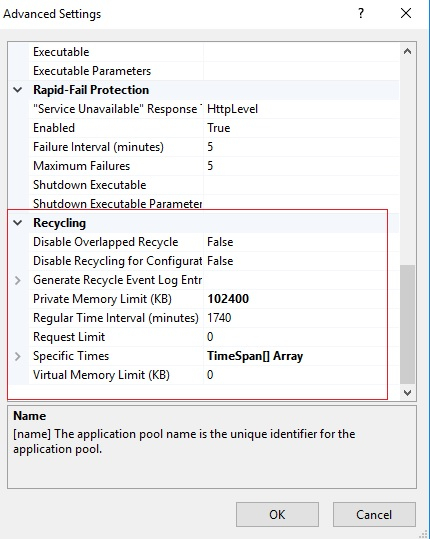
要使用 PowerShell 检索上述设置,我们可以使用 Get-IISAppPool 命令并指定特定的应用程序池名称。我们有一个应用程序池 DefaultAppPool,我们需要检索其 回收 设置。
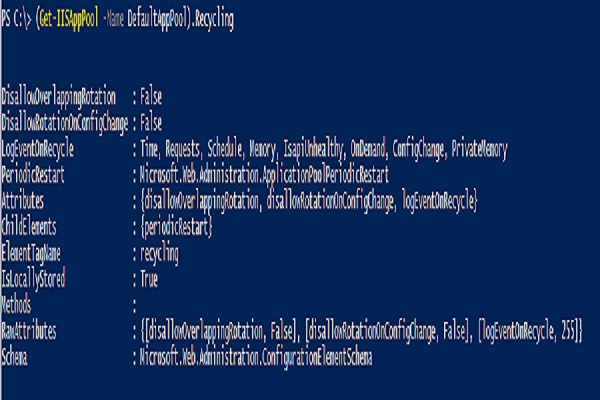
PS C:\> (Get-IISAppPool -Name DefaultAppPool).Recycling
输出
以下设置用于定期重启。
PS C:\> (Get-IISAppPool -Name DefaultAppPool).Recycling.PeriodicRestart
输出
Memory          : 0
PrivateMemory   : 102400
Requests        : 0
Schedule        : {add}
Time            : 1.05:00:00
Attributes      : {memory, privateMemory, requests, time}
ChildElements   : {schedule}
ElementTagName  : periodicRestart
IsLocallyStored : True
Methods         :
RawAttributes   : {[memory, 0], [privateMemory, 102400], [requests, 0], [time, 1.05:00:00]}
Schema          : Microsoft.Web.Administration.ConfigurationElementSchema
通过进一步扩展,您可以添加 Privatememory、Time 等属性。

