
如何使用 PowerShell 获取 Windows 性能计数器?
powershellmicrosoft technologiessoftware & coding
要使用 PowerShell 获取 Windows 性能计数器,我们可以使用 Get-Counter cmdlet。
有多种性能计数器可用于衡量 Windows 操作系统的性能。Get-Counter cmdlet 用于检索具有特定计数器名称的本地或远程系统的性能。
运行 Get-Counter 命令后,它会显示本地系统上的主要基本计数器,例如网卡、处理器、磁盘等,如下所示。
示例
PS C:\> Get-Counter
Timestamp                 CounterSamples
---------                 --------------
4/7/2021 7:41:42 PM       \labmachine2k16
etwork interface(intel[r] 82574l gigabit network connection)\bytes total/sec :
                          0
                          \labmachine2k16
etwork interface(isatap.{5008ca11-6974-4ec6-b2d7-eef6f9632c45})\bytes total/sec :
                          0
                          \labmachine2k16\processor(_total)\% processor time :
                          65.3778486182899
                          \labmachine2k16\memory\% committed bytes in use :
                          36.8481297364571
                          \labmachine2k16\memory\cache faults/sec :
                          1168.99908419505
                          \labmachine2k16\physicaldisk(_total)\% disk time :
                          16.2392354345686
                          \labmachine2k16\physicaldisk(_total)\current disk queue length :
                          2
要获取远程系统上的计数器,请使用 -ComputerName 参数。
示例
Get-Counter-ComputerNameTestMachine
要获取各种可用计数器列表,请使用 -ListSet 参数。
示例
Get-Counter -ListSet *
输出
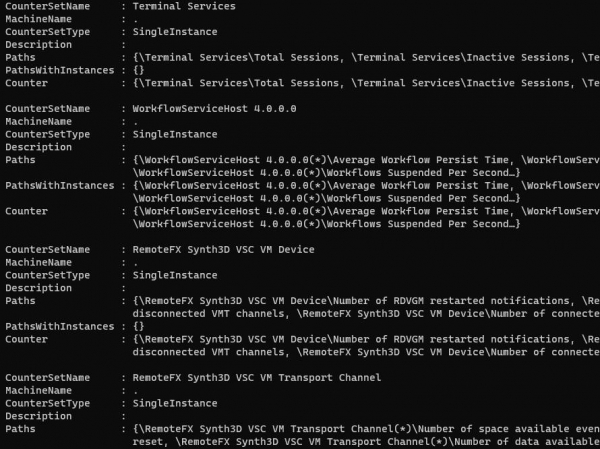
您可以查看包含各种计数器的 counterSetName。在 `Counter` 属性中。`machinename` 属性显示本地或远程计算机。点号 (.) 表示本地计算机名称。
要查找与 `Processor` 相关的特定计数器,请使用以下命令。
示例
Get-Counter -ListSet * | where{$_.CounterSetName -like "*Processor*"} | Select CounterSetName, Counter
输出
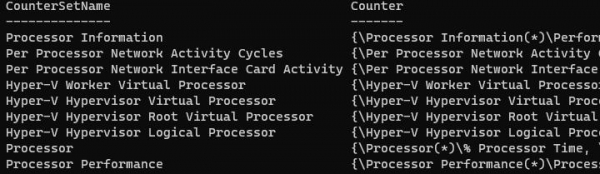
类似地,要获取与磁盘相关的计数器,请使用以下命令。
示例
Get-Counter -ListSet * | where{$_.CounterSetName -like "*disk*"} | Select CounterSetName, Counter

